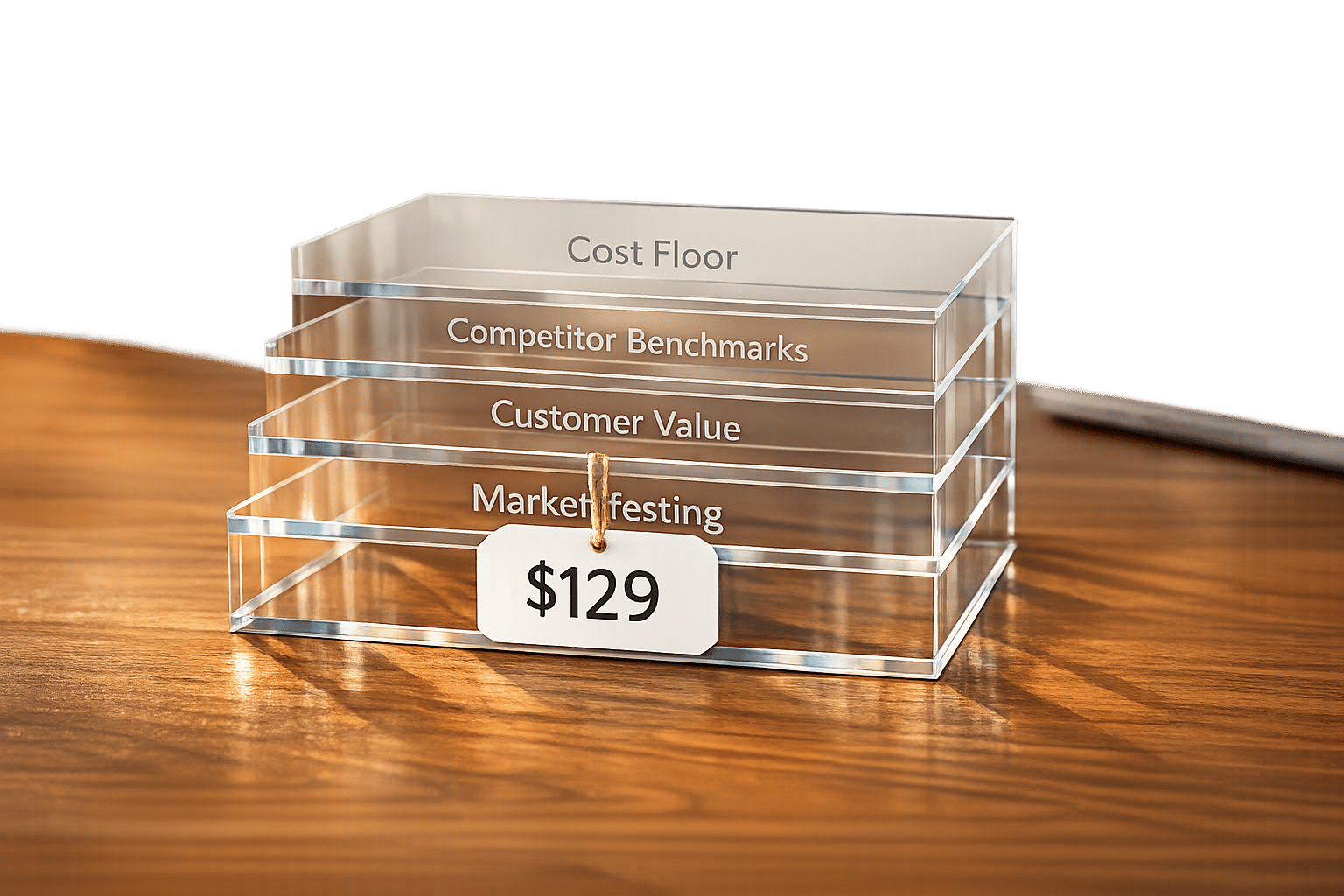
Setting the right price for a new product can be challenging, especially without sales data to guide you. But don’t worry - here’s the framework you need:
- Start with clear goals: Decide if you want to maximize profits, enter the market quickly, or position your product as premium.
- Calculate your price floor: Add up all costs (materials, labor, packaging, etc.) and ensure you’re covering them with a healthy margin (40%+ for physical products, 70–90% for SaaS).
- Research competitors: Benchmark prices across 8–12 competitors to understand the market range and where your product fits.
- Focus on customer value: Use tools like the 10x Value Rule (price at 10% of the value your product delivers) and surveys to gauge willingness to pay.
- Test your pricing: Experiment with different models (e.g., tiered, flat rate) and refine based on real-world feedback before launch.
Pricing isn’t static - it’s a process. By combining cost analysis, market research, and customer insights, you can confidently set a price that reflects your product’s value and drives success.
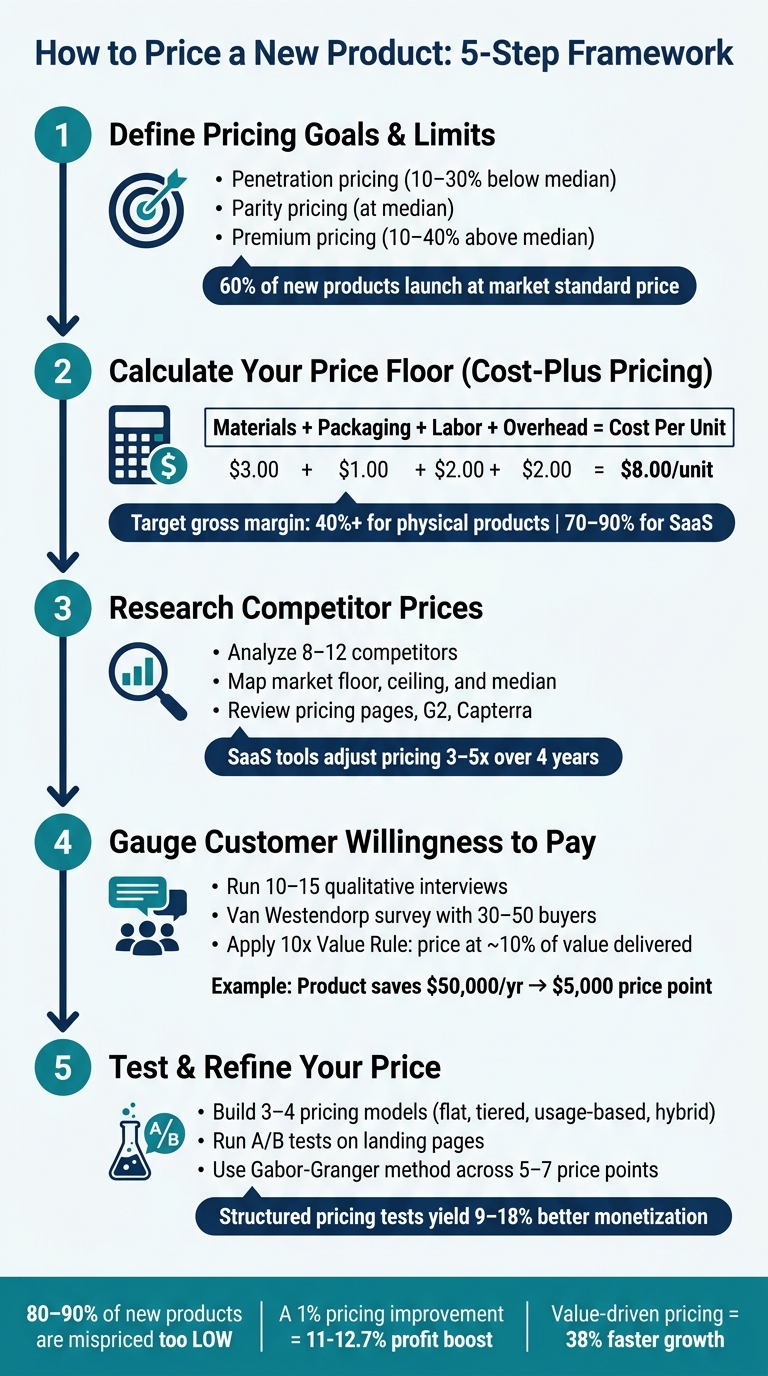
How to Price a New Product: 5-Step Framework
How to Price Your Products (Pricing Strategy Guide)
sbb-itb-08dd11e
Step 1: Define Your Pricing Goals and Limits
When you don't have sales data to guide you, the first step is to set clear goals and boundaries for your pricing. Before diving into numbers, think about what you want your pricing to achieve. A clear purpose helps you avoid decisions that don’t serve your business.
Set Clear Pricing Goals
Your pricing goal is the foundation for every decision that follows. Are you aiming to maximize profits right away, grab attention in a competitive market, or position your product as a premium option? Whether your focus is on profit, quick market entry, or signaling exclusivity, your goal will shape your starting price.
Two common strategies are penetration pricing and price skimming. Penetration pricing involves starting with a lower price to quickly attract customers, while price skimming sets a higher initial price to capture early adopters who are willing to pay more. Interestingly, about 60% of new products launch at the market’s standard price, with only 20% using either skimming or penetration pricing. There’s no one-size-fits-all strategy here - what matters is making a deliberate choice.
A helpful method to consider is the "10x Value Rule", which suggests pricing your product at about 10% of the measurable value it delivers to customers. For instance, if your product saves a small business $5,000 annually in labor costs, a $500 price point becomes much easier to justify.
"Price is the only component of the marketing mix that generates revenue; everything else is cost." - LeanPivot.ai
Once you've identified your pricing goal, determine the minimum price you need to cover your costs.
Know Your Financial Limits
Every price has a minimum threshold - the point where you break even. To find this, add up all the costs involved in producing and delivering one unit of your product. This includes materials, labor, packaging, shipping, payment processing fees, and a share of your fixed costs (like rent, salaries, and software subscriptions).
This calculation gives you your break-even price. Pricing below this point isn’t sustainable. To keep your business healthy, aim for a gross margin of at least 40%, though software products often target margins of 80% or more. These margins give you the flexibility to invest in marketing, customer support, and product development without risking your cash flow.
Match Price to Product Positioning
Once you’ve set your financial boundaries, align your price with the market tier you’re targeting. Whether your product is positioned as value, mid-market, or premium, the price needs to reflect that position. A premium product should have a price that communicates quality, while a value-focused product should feel affordable.
Here’s a general guideline: penetration pricing often falls 10–30% below the market median, parity pricing aligns with the median, and premium pricing tends to sit 10–40% above it. Deciding your product’s positioning early on is key, as it will guide every pricing decision you make from here on out.
Step 2: Calculate a Price Floor Using Cost-Plus Pricing
Once you've outlined your pricing goals and limits, it's time to figure out your price floor - the absolute minimum you can charge without dipping into losses. Cost-plus pricing is the go-to method for this.
Break Down Your Costs
Every product comes with variable and fixed costs. Variable costs are tied directly to production, such as raw materials, labor, packaging, and shipping. Fixed costs, on the other hand, stay the same no matter how much you sell. These include things like rent, software subscriptions, and employee salaries.
Don't overlook hidden operational costs. For instance, payment processing fees can take 2–4% of your revenue, and selling on platforms like Amazon might cost you anywhere from 15–45% in fees. To allocate fixed costs per unit, divide your total monthly fixed expenses by the number of units you plan to sell. For example, if your fixed costs are $1,000 per month and you expect to sell 500 units, that's $2.00 of overhead per unit.
Here’s a simple breakdown:
$3.00 for materials + $1.00 for packaging + $2.00 for labor + $2.00 for overhead = $8.00 per unit.
"Underpricing can quickly lead to cash flow problems, even if sales volume is high." - Jurica Šinko, Finance Expert
Once you've nailed down your total cost per unit, the next step is to add a markup to determine your selling price.
Apply a Markup to Set Your Price
To calculate your selling price, use this formula:
Selling Price = Total Cost × (1 + Markup %).
A common approach for beginners is keystone pricing, which applies a 50% markup. However, the right markup varies by industry. For example, software and SaaS products often have markups between 233–567%, while physical retail products typically range from 43–100%. A quick trick: multiply your total cost by 2 for a 50% gross margin or by 3 for a 67% gross margin.
Keep in mind the difference between markup and margin. For instance, a 50% markup on an $8.00 product gives you a selling price of $12.00. However, the gross margin in this case is only 33.3%, which could lead to pricing errors if not understood.
Check That the Numbers Work
To ensure your price is practical, calculate two key figures:
- Gross Margin: [(Selling Price − Cost) ÷ Selling Price × 100]
- Breakeven Volume: [Fixed Costs ÷ (Selling Price − Variable Cost per Unit)]
For physical products, aim for a gross margin of at least 40%. For SaaS or digital products, margins are often higher, between 70–90%. If your breakeven volume seems unattainable for your market, revisit your pricing or cost structure before moving forward.
If crunching these numbers sounds tedious, tools like IdeaFloat's Cost Analysis can simplify the process. With it, you can test different markup scenarios and instantly see how they affect your breakeven point and gross margin. This can save time and help you make informed pricing decisions more efficiently.
Once you've locked in your price floor, the next step is to analyze competitor and market pricing to make sure your strategy holds up.
Step 3: Research Competitor and Market Prices
Once you've determined your price floor, the next step is to dive into competitor and market pricing. Knowing what others in your space charge - and the reasoning behind their pricing - gives you a clearer picture of where your product stands and helps you set realistic price points.
Find Comparable Products
Start by identifying 8–12 competitors, including both direct competitors and those offering similar solutions. Go beyond the first page of search results - explore paid ads and discussions on platforms like Reddit, LinkedIn groups, and niche Facebook communities. These spaces often highlight products your target customers are already considering. For each competitor, review their pricing pages, feature lists, and customer reviews on sites like G2 or Capterra. Customer feedback can provide valuable insights into whether users feel a product is overpriced, underpriced, or missing crucial features.
Map the Competitive Price Range
With your research in hand, create a simple benchmark table. Include each competitor's entry-level, mid-tier, and top-tier prices, along with their billing models (e.g., per seat, usage-based, or flat rate). From this data, calculate three key figures: the market floor (lowest price), the market ceiling (highest price), and the median price. These benchmarks will help you identify where your product fits.
- If you're aiming for quick market penetration, consider pricing 10–30% below the median.
- For a premium position, price 10–40% above the median, but ensure you can justify the higher cost with added value, such as better results, more integrations, or superior customer support.
"Pricing is the single most important variable in any competitive market. It's also the one that gets the least structured analysis." - Ibby Syed, Founder, Cotera
Keep in mind that competitor pricing evolves. In fast-moving SaaS markets, established tools often adjust their pricing 3–5 times over four years. To stay competitive, set a quarterly reminder to update your benchmark table. This practice ensures you're always aligned with market trends and ready for the next step: assessing customer willingness to pay.
Use IdeaFloat for Competitor Analysis
Manually tracking 8–12 competitors can be a daunting task. This is where IdeaFloat's Competitor Analysis tool comes in handy. It automates market research, highlighting pricing gaps and competitor weaknesses, which simplifies decision-making. For instance, the tool can help identify opportunities, like a lack of usage-based pricing in a market dominated by flat monthly fees. Spotting these gaps can give you a strategic edge.
Step 4: Gauge What Customers Are Willing to Pay
Once you've validated your pricing using cost and competitor analysis, it's time to shift your focus to how customers perceive the value of your product. Instead of asking yourself, "What do I need to charge?", reframe the question to "What is this worth to my customer?". This shift in perspective is the foundation of value-based pricing.
What Is Value-Based Pricing?
Value-based pricing revolves around setting your price based on what customers believe your product is worth, rather than basing it on production costs. Ivana Taylor from DIYMarketers explains it perfectly:
"Price based on what your customer believes your product is worth - not what it costs you to make it."
A helpful guideline here is the 10x Value Rule: price your product at roughly 10% of the economic value it delivers. For example, if your product saves a customer $50,000 annually in labor costs, a $5,000 price point is often seen as a no-brainer. This approach ties your pricing to the tangible outcomes your customers experience, rather than internal cost considerations.
With this framework in mind, the next step is to directly assess how much your customers are willing to pay.
Research Customer Willingness to Pay
Start by conducting 10–15 qualitative interviews with a mix of potential customers, current users of similar products, and even those who decided not to purchase. These conversations can uncover key outcomes and success metrics that matter most to your audience.
Once you have this qualitative data, follow it up with a Van Westendorp Price Sensitivity survey. This survey, conducted with 30–50 potential buyers, asks four key questions:
- At what price does the product feel too cheap?
- At what price does it feel like a bargain?
- At what price does it start to feel expensive?
- At what price is it too expensive?
The intersection of the "too cheap" and "too expensive" responses gives you the Optimal Price Point (OPP) - the price range that your target market finds most acceptable. Tools like Typeform (starting at around $29/month) or the free option Tally make these surveys easy to set up and distribute.
For a faster approach, you can use IdeaFloat's Consumer Insights tool. This tool automatically scans online forums and communities to uncover what customers are already saying about products similar to yours. It helps you understand the language they use to describe value and the frustrations that might make them willing to pay more.
Once you've gathered this data, the next step is to quantify how each product feature translates into measurable financial benefits.
Link Features to Dollar Value
To build a data-driven pricing strategy, connect each feature of your product to a specific financial impact. Use the framework below to quantify these outcomes and ensure your pricing is defensible and backed by evidence.
| Feature Category | Customer Problem Solved | Estimated Monetary Impact (USD) |
|---|---|---|
| Must-Haves | Core pain point / manual labor replacement | High - e.g., $50,000+ in annual labor savings |
| Should-Haves | Workflow efficiency / time savings | Moderate - e.g., 10–20 hours saved per month |
| Nice-to-Haves | Convenience / branding / aesthetics | Low - e.g., incremental brand value |
| Enterprise/SLA | Risk mitigation / downtime prevention | High - e.g., cost of one hour of system outage |
As Kris Carter, Founder of Segment8, points out:
"If you can't explain why your price is $199 vs. $149 with data, you haven't done enough research."
This approach is especially critical for new products with no sales history. Without clear, data-backed reasoning, your pricing may seem arbitrary - and customers will notice.
Step 5: Test and Refine Your Price Before Launch
Once you've gathered insights on costs, competitors, and customer preferences, the next step is to test and fine-tune your pricing before going live.
Develop Multiple Pricing Models
Start by creating three to four pricing models - options like flat rate, tiered, usage-based, or hybrid structures. These models allow you to evaluate key metrics like conversion rates, unit sales, and overall revenue. For instance, while lowering a price from $79 to $29 might double conversions, it could also reduce total revenue by 27%. Interestingly, even a 10% improvement in pricing strategy can have a more significant revenue impact than similar gains in customer acquisition or retention.
To further refine your approach, consider using the Gabor-Granger method. This technique involves presenting 5–7 price points to potential buyers, helping you map demand curves and pinpoint critical price thresholds. This data can guide you in deciding whether to aim for higher sales volume or position your product as a premium offering.
Once you've developed these models, run controlled experiments to get a clearer picture of how they perform in the real market.
Run Controlled Pricing Experiments
After narrowing down your price points, it's time to test them with actual audiences. History shows the risks of mishandling pricing experiments - take Amazon's DVD pricing fiasco as an example. The backlash over demographic-based price differences led to a public apology from Jeff Bezos and a ban on such practices.
For your own tests, segment groups by factors like customer type, location, or signup period, ensuring that existing customers remain unaffected. When conducting A/B tests on landing pages, keep everything - headlines, features, and calls to action - consistent except for the price. This approach isolates the effect of price changes, allowing you to measure price elasticity accurately. A good metric to focus on is Revenue Per Visitor (RPV), which balances price level and conversion rate in a single figure.
Keep in mind that survey data can overestimate demand - stated purchase intent often exceeds actual behavior by three to five times. To adjust for this, apply discounts to survey responses: count 75% of "definitely buy" responses and 25% of "probably buy" ones when projecting revenue.
Use IdeaFloat's AI Pricing Tools
Once your experiments are complete, tools like IdeaFloat can help validate and optimize your pricing model. Their Advanced Pricing Research tool simplifies scenario modeling by analyzing market data, applying pricing theories, and offering AI-driven recommendations. You can also manually fine-tune prices using live competitor data.
For financial planning, IdeaFloat’s Financial Projections & Breakeven Analysis tool provides detailed revenue and cost projections, breakeven calculations, and funding alerts. Interactive graphs help visualize how each pricing scenario impacts profitability - no finance expertise required. These tools are part of the Pro plan, available at $40/month, which also includes a full validation toolkit and launch plan.
Structured pricing experiments can yield impressive results. Companies that take this approach often see a 9% to 18% improvement in monetization compared to those that skip testing. A few days of focused testing and modeling could become one of the most impactful investments in your product launch.
Conclusion: How to Price a New Product With Confidence
Pricing a new product without sales history doesn't have to be overwhelming. Start by defining clear pricing goals, calculate your cost floor, and ground your decisions in competitor data and the value your product offers to customers.
Beyond the numbers, your mindset plays a huge role. Pricing is more than just a number; it's a way to communicate value. Studies reveal that 80–90% of new products are mispriced by being set too low rather than too high. Even a small adjustment - just a 1% improvement in pricing - can boost profits by 11% to 12.7%.
"The customer's perception is your pricing compass." - Ivana Taylor, DIYMarketers
The most effective pricing strategies balance cost analysis, competitor research, and customer value. Businesses that tie their pricing directly to value metrics grow 38% faster than those using arbitrary methods. That’s a serious edge in the market.
Once you've set your initial price and begun testing, remember that pricing isn’t static. As Patrick Campbell, Founder of ProfitWell, wisely notes: "Pricing is a dial, not a plaque." Keep refining your strategy based on real customer feedback, market trends, and competitor behavior. Tools like IdeaFloat's Advanced Pricing Research and Financial Projections features can help you make smarter, faster adjustments using data-driven insights.
FAQs
How do I pick a starting price if my cost floor is above the market?
If your cost floor is higher than market rates, relying solely on cost-based pricing can make your product less competitive. Instead, shift to value-based pricing by emphasizing the tangible benefits your product offers - think along the lines of saving time or boosting revenue. Tools like the Van Westendorp Price Sensitivity Meter or Gabor-Granger techniques can help you understand what customers are willing to pay. If your costs are still too high, consider standing out by offering better features or delivering superior results to justify a higher price point.
What’s the fastest way to estimate willingness to pay before launch?
When trying to determine the right price for your product or service, one of the fastest ways is to directly interview 10–15 potential customers. Ask them a straightforward question: "What would you pay to completely solve this problem?" Instead of asking for a single figure, request a range. This approach helps you identify patterns in their responses.
For a more structured approach, consider using the Van Westendorp Price Sensitivity Meter. This method involves asking four specific questions to establish a pricing range. It works best when you gather 30–50 survey responses, providing you with solid data to guide your pricing decisions.
When should I change price after launch, and by how much?
Adjusting pricing works best when tied to clear, measurable goals - like increasing user adoption or accounting for shifts in costs. To maintain customer trust, consider keeping existing users on their current plans unless you're introducing new features or offering enhanced services. If a price adjustment is unavoidable, be upfront about it: explain the reasons, provide a clear timeline, and outline how it will affect users.
Once the change is implemented, pay close attention to user feedback and churn rates. If churn exceeds 20% within the first two months, it might be worth experimenting with a 10–15% price reduction to find a better balance.
Related Blog Posts
- How to Price Your Product: A Beginner's Guide
- Idea to Pricing: A Simple Formula for Your First 3 Offers
- How to Test Your Pricing Before a Full Launch
- How to Price Products for Healthy Margins Without Killing Demand