Need a pitch deck in hours, not days? By 2026, entrepreneurs are creating polished, investor-ready decks in just 4 hours using AI tools. This approach saves up to 90% of the time and delivers results with 2.3x higher conversion rates compared to traditional methods. Here’s the streamlined process:
- Hour 1: Define your story, outline slides, and compile key data.
- Hour 2: Use AI tools (like Canva or Beautiful.ai) for professional slide design.
- Hour 3: Write speaker notes and refine your delivery with AI feedback.
- Hour 4: Review for consistency, polish visuals, and finalize the deck.
With tools costing as little as $0–$50/month, you can skip the $2,000+ agency fees and focus on what matters most - your pitch. Whether it's validating your market, structuring slides, or crafting a script, AI handles 80% of the work, freeing you to focus on delivering a clear, data-backed message. Let AI simplify your next pitch sprint.
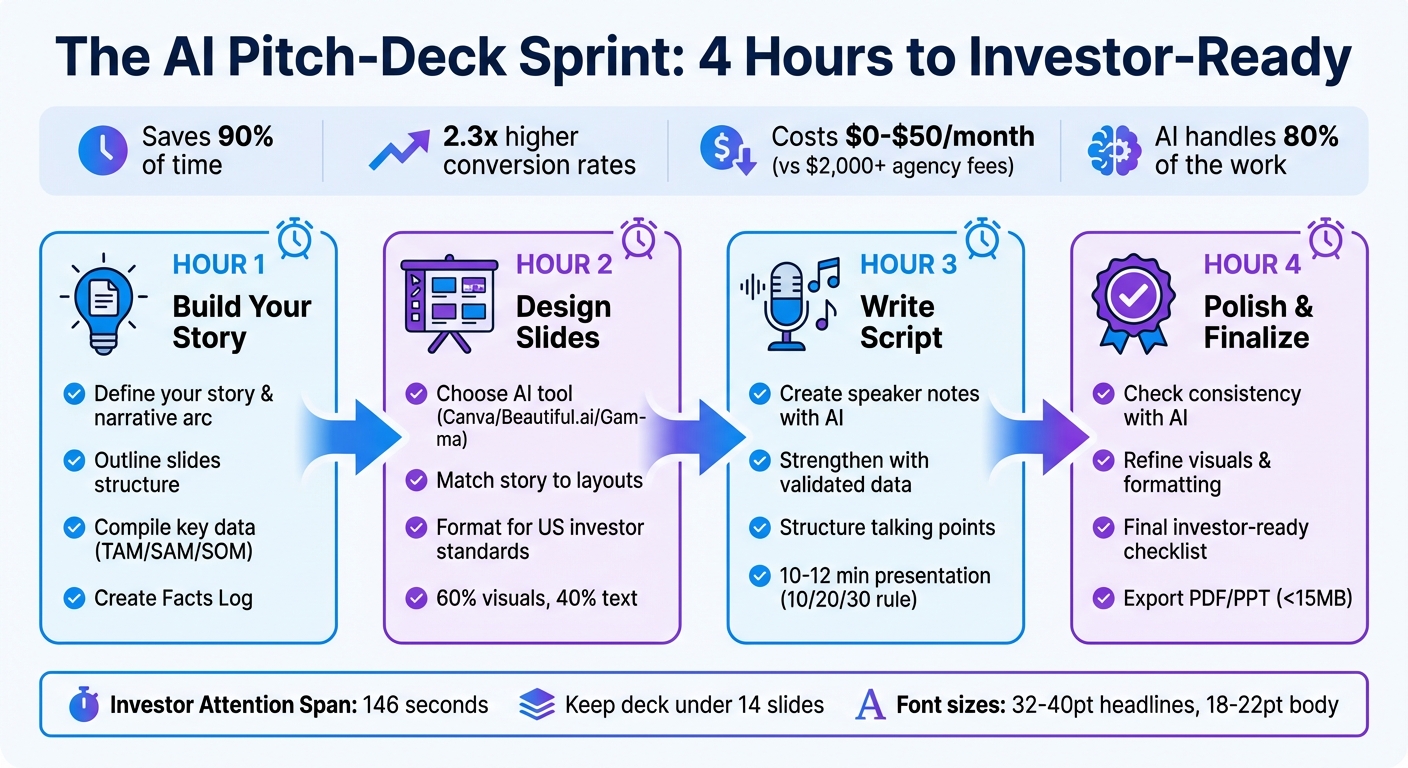
4-Hour AI Pitch Deck Creation Process: Step-by-Step Timeline
Hour 1: Build Your Story with AI
Define Your Core Story
The first step in your 4-hour journey is crafting a strong narrative using IdeaFloat’s tools. This hour is all about laying the groundwork for your pitch deck.
Start with the Problem Validator in IdeaFloat to pinpoint the exact challenge your business addresses. This tool helps you gauge urgency and spot early warning signs before you invest too much. Next, dive into the Competitor Analysis to map out your market. Identify who your competitors are, what they do well, where they fall short, and how your solution stands out. Finally, use Smart Market Sizing to calculate your Total Addressable Market (TAM), Serviceable Addressable Market (SAM), and Serviceable Obtainable Market (SOM) in USD.
Once you’ve gathered this data, craft your one-line narrative arc:
"We help [Ideal Customer Profile] solve [pain] with [solution] to achieve [value], growing via [Go-To-Market Plan], backed by [moat]."
This single sentence will serve as your guiding principle for the entire pitch deck. For example, if you’re building a B2B SaaS tool, your statement might look like this:
"We help mid-market HR teams solve manual onboarding bottlenecks with an AI workflow platform to achieve 80% faster time-to-productivity, growing via outbound sales to 5,000-employee companies, backed by proprietary data."
Keep each part of the sentence between 8–12 words for clarity and impact.
Next, create a Facts Log in a Google Sheet. Include five columns: Metric, Definition, Source, Timeframe, and Slide. For example, if your SOM is $42 million based on the Smart Market Sizing tool, log it like this:
- SOM | Serviceable Obtainable Market | IdeaFloat Smart Market Sizing | January 2026 | Slide 4
This log ensures accuracy and consistency, especially since investors often use AI tools to verify claims. With your narrative and data in place, you’re ready to move on to structuring your slides.
Generate Your Slide Structure with AI
Use ChatGPT to create a professional outline for your pitch deck. Here’s a prompt to get started:
"Create a 12-slide investor pitch deck outline for a Seed-stage startup using this order: Intro, Problem, Solution, Market Size, Product, Business Model, Traction, GTM, Competition, Team, Financials, and Ask. Keep headlines to 8–12 words and limit body bullets to a maximum of three per slide."
This structure aligns with the standards set by Sequoia and Y Combinator, which many investors expect. Keep in mind that the first three slides - Intro, Problem, and Solution - carry the most weight, often influencing 70% of an investor’s decision. Use the strongest data from IdeaFloat or highlight standout team achievements in these early slides.
After generating the outline, review it carefully. Remove any slides that don’t add value, aiming to keep your deck under 14 slides. For example, your Intro slide should clearly highlight your one-line narrative arc. The Problem slide should quantify the pain point using data from IdeaFloat’s Consumer Insights. And the Solution slide should focus on 2–3 key outcomes instead of listing every feature. As andywang from Skywork.ai puts it:
"12 slides or fewer tell a crisp story backed by proof, not prose."
Turn Data into Investor-Friendly Points
Now it’s time to transform your validated data into concise, impactful bullet points. Take the insights from IdeaFloat - like financial projections, TAM/SAM/SOM figures, or competitor analysis - and ask ChatGPT to refine them. Use a prompt such as:
"Transform these data points into investor-friendly bullets. Keep each bullet between 8–12 words, with a maximum of three bullets per slide. Use active voice and quantify outcomes."
For instance, if your financial projections show $500,000 ARR by month 18, rephrase it as:
"Reach $500K ARR by Q2 2027 with 65% gross margin."
Statements like this are specific, concise, and build credibility.
Leverage the bottom-up market sizing method from IdeaFloat’s Smart Market Sizing tool. Multiply your Ideal Customer Profile count by the Average Revenue Per User (ARPU), then apply a realistic adoption rate. For example, if you estimate 10,000 potential customers at $100 ARPU with a 5% adoption rate in the first year, your SOM would calculate to $50,000. This approach is transparent and far more convincing than vague top-down estimates. Double-check all figures against your Facts Log to avoid inconsistencies - investors notice errors quickly.
Finally, use ChatGPT as a mock investor. Ask it to act as a "2025 VC" and critique your points:
"What objections would a seed-stage investor raise about these bullets?"
Incorporate the feedback into your slides to preemptively address doubts. This proactive step can make your pitch far more compelling and resilient.
Hour 2: Design Your Slides with AI Tools
Pick Your AI Presentation Tool
When it comes to transforming your outline into polished slides, you’ve got three excellent tools to consider: Canva, Beautiful.ai, and Gamma. Each offers unique strengths. Canva is perfect for maintaining brand consistency, thanks to its extensive asset library and the Brand Kit feature - ideal if you already have established visual guidelines. Beautiful.ai simplifies the process with Smart Slides that adjust layouts and spacing automatically, delivering professional results without the hassle of manual formatting. Gamma, on the other hand, shines for speed, creating both slide structure and visuals from simple text prompts in just minutes.
All three tools allow you to export your presentation in PDF or PowerPoint formats. For added flexibility, consider upgrading: Gamma’s Pro plan costs $15/month to remove branding, while Canva’s Pro version is $119.99/year, offering team-friendly features. Beautiful.ai’s Pro plan starts at $12/month, catering to users focused on creating professional presentations.
Match Your Story to Slide Layouts
AI tools can take your narrative and suggest layouts that align with your story. For instance, if you’re working on a “Problem” slide in Beautiful.ai, the tool can automatically apply a bold, data-focused layout to emphasize your points. Canva and Gamma operate similarly, generating slide structures that fit the themes investors expect to see.
To ensure consistency, process your slides in small batches - about 3–4 at a time - and review each to confirm they support your claims visually. If you’re using Canva, set up your Brand Kit once, defining your colors, fonts, and logo, and let the AI apply these elements consistently across all slides. Replace generic stock photos with meaningful visuals, like contextual images or screenshots of your actual product. Interestingly, Decktopus users create over 402,000 presentations monthly, saving themselves an average of 10 hours per week.
Once your slides align with your story, you’re ready to format them to meet the expectations of US investors.
Format for US Investor Standards
To make sure your deck resonates with US investors, focus on formatting that grabs attention quickly. Research shows that investors spend an average of just 146 seconds reviewing a pitch deck, so clarity is crucial. Use font sizes between 32–40 pt for headlines and 18–22 pt for body text to ensure readability on-screen. Present financial data in USD ($), use dates in MM/YYYY format, and standardize metrics like ARR, MRR, and CAC to avoid confusion.
Keep your slides balanced: aim for about 60% visuals and 40% text, with no more than three bullet points per slide. For accessibility, ensure your design meets WCAG 2.2 AA contrast ratios (4.5:1 for normal text). To build credibility, add footnotes to every chart that specify the timeframe, definitions, and data sources. For seamless updates, link your charts directly to your financial model using tools like PowerPoint’s “Paste Link” or Google Slides’ “Link to Spreadsheet.” This ensures your data stays accurate and up to date.
Hour 3: Write Your Script and Speaker Notes
Create Speaker Notes with AI
With your slides ready, the next step is crafting a script that delivers your story effectively. A strong script is essential - without it, your pitch risks falling flat. Tools like ChatGPT can help you draft speaker notes by summarizing slide content and transforming bullet points into full, conversational sentences. To keep your narrative flowing smoothly, work on 3–4 slides at a time. Use prompts such as "Simplify language and ensure technical accuracy; suggest tighter headlines" to refine the AI's suggestions.
"AI assists, humans decide." - Peony.ink
When practicing your voiceover, aim to keep each slide under 45 seconds. If you find a section running too long, ask the AI to revise it for conciseness. Research shows that 92% of Fortune 500 companies already use ChatGPT for business tasks, including presentations. Additionally, pitch decks enhanced by AI achieve 103% longer reading times and 2.3x higher conversion rates. To prepare for challenging questions, you can prompt the AI to act as a venture capitalist and generate 10 tough questions about your traction, unit economics, and defensibility. Use these insights to refine your talking points and anticipate investor concerns.
Strengthen Your Message with IdeaFloat Data
Your validated data from IdeaFloat can be a game-changer for your pitch. Revisit your workspace to extract key metrics from sections like your Unique Value Proposition, Go-to-Market Strategy, and Financial Model. Include specific data points - such as CAC, LTV, or MRR growth - directly in your AI prompts to ensure accuracy in your script. As a tip, remember that U.S. investors in 2025–2026 are prioritizing efficient growth (e.g., Net Revenue Retention ≥100%) and AI defensibility (proprietary data and workflow integration). Make sure your script highlights these areas clearly.
To stay organized, create a "Facts Log" with three columns: Metric, Definition, and Source. For example, if your CAC is $120, include the timeframe (e.g., January–December 2025) and the source (e.g., Google Ads dashboard). This log ensures your claims are credible and provides you with solid answers during Q&A sessions. For slides like "Traction", always pair growth metrics with specific timeframes and units. Investors don’t just want to know that you hit milestones - they want to know when and how.
Structure Your Talking Points
Each slide should focus on a single core idea. To maintain consistency, craft a "story spine" for each slide that follows this structure: Problem → Solution → Why Now → Proof → Ask. This approach ties your talking points to a cohesive narrative, supported by both your slide content and data from IdeaFloat. For a 10–12 slide deck, aim for a 10–12 minute presentation, sticking to the 10/20/30 rule.
| Slide Type | Key Message | Time Limit |
|---|---|---|
| Problem | Quantify urgency with credible stats and sources | 30–45 seconds |
| Solution | Emphasize 2–3 core outcomes, not features | 30–45 seconds |
| Traction | Pair growth metrics with timeframes and units | 30–45 seconds |
| The Ask | Tie funding to 24–36 month milestones | 30–45 seconds |
Use prompts like "Write a one-sentence company purpose that is concrete and specific (≤14 words)" to keep your value proposition sharp. If your script feels rushed during a practice run, edit ruthlessly for clarity and flow. While tools like Beautiful.ai can generate speaker notes automatically by pulling from your slides, you’ll still need to fine-tune them to meet investor expectations and match your personal delivery style.
sbb-itb-08dd11e
Hour 4: Polish and Finalize Your Deck
Check for Consistency with AI
Accuracy is everything when it comes to your pitch deck. AI tools can handle about 80% of the creation process, but the final 20%? That’s where human attention makes all the difference. Start by running a consistency check using tools like ChatGPT. A prompt such as, "Act as a VC. Identify vague claims, missing sources, and weak competition framing" can help uncover potential issues before they become problems in front of investors. This step is crucial for catching unrealistic projections, missing data, or generic language that could harm your credibility.
Double-check every figure against your Facts Log. For IdeaFloat users, revisit your workspace to ensure the metrics in your Financial Model and Go-to-Market Strategy match the data in your slides. For instance, if your deck states a CAC of $120, confirm that figure aligns with your Google Ads dashboard for the relevant period. Consistency like this reassures investors and prevents awkward corrections during Q&A sessions.
Once your data is solid, it’s time to shift your focus to the visual presentation of your deck.
Refine Your Visuals and Formatting
With data verified, turn your attention to making your slides visually appealing. AI-powered design tools like Beautiful.ai or Canva can help you achieve a polished look for as little as $0–$50 per month. Stick to a cohesive design by using a consistent brand kit across all slides. Limit yourself to 1–2 fonts and a palette of 3–4 colors for a professional and clean appearance. For readability, use font sizes of 32–40 pt for headlines and 18–22 pt for body text. This is especially important since up to 30% of investors may view your deck on mobile devices.
Aim for a layout that balances visuals and text - about 60% visuals to 40% text. Each slide should focus on one main idea, with no more than three bullet points per slide. Replace generic stock photos with authentic images of your team or product to make a stronger connection with investors. For charts, ensure all axes are labeled, units are clear, and footnotes cite data sources. If possible, link charts directly to Google Sheets or Excel to allow real-time updates without manual edits.
By aligning your visuals with accurate data, you strengthen your overall message and build trust with your audience.
Final Investor-Ready Checklist
Before sending out your deck, make sure it meets the expectations of U.S. investors. All financial metrics should be presented in USD, and your market sizing should follow a bottom-up approach (TAM/SAM/SOM), complete with explicit calculations and cited sources. Ensure your deck is digitally accessible - avoid embedding key text in images and use standard terminology like "ARR", "MRR", and "Runway". Remember, the average investor spends just 146 seconds reviewing a deck, so every detail matters.
Here’s a final checklist to guide your review:
- Does your one-sentence value proposition appear by Slide 2?
- Are your slides in a logical order (Problem, Solution, Market, Traction, Team, Financials, Ask)?
- Is your "Ask" clearly connected to milestones for the next 24–36 months?
Export your deck in both PDF and PPT formats, ensuring both versions render correctly. Keep the file size under 15MB. Perform a six-foot readability test - if you can’t comfortably read your slides from six feet away, your font sizes might be too small. Finally, record a 5-minute voiceover of your pitch. If any slide takes more than 45 seconds to explain, simplify the content.
| Checklist Category | Essential Requirements |
|---|---|
| Narrative | One-sentence value proposition; "Why Now" urgency; clear "Ask" tied to milestones |
| Design | 2 fonts maximum; 3–4 brand colors; high contrast; 30pt+ fonts |
| Financials | USD format; burn rate/runway; LTV:CAC metrics; bottom-up market sizing |
| Technical | PDF/PPT formats; mobile responsive; digitally accessible; under 15MB |
This final review is your chance to bring together strategy, design, and technical precision, ensuring your deck is ready to make a lasting impression.
Conclusion: Your Repeatable AI Workflow
What You've Learned
In just four hours, you transformed initial ideas into a polished, investor-ready pitch deck. Here's a quick recap of how each hour was spent:
- Hour 1: You laid the foundation by using AI prompts to craft your core story, define your value proposition, and outline a logical slide structure.
- Hour 2: You shifted to design, pairing your narrative with professional layouts using AI presentation tools.
- Hour 3: This hour was all about creating speaker notes and talking points to enhance your delivery.
- Hour 4: You wrapped it all up with consistency checks, visual refinements, and a final investor-ready review.
This streamlined process ensures your pitch deck not only looks professional but also connects with investors right from the first slide. By leveraging AI, you completed 80% of the work and cut manual effort by over 90%.
How to Reuse This Workflow
The beauty of this system lies in its reusability. Save your Facts Log as a master template, refresh the data, and update live-linked charts from tools like Google Sheets or Excel to create new decks effortlessly.
You can also tweak the deck to suit different audiences. For instance:
- When pitching to deep tech investors, include an "Underlying Magic" section to highlight your technology's uniqueness.
- For consumer-focused VCs, emphasize metrics like DAU/MAU ratios and retention rates.
If you're using IdeaFloat, you can maintain separate workspaces for each business line. This keeps your Financial Model and Go-to-Market Strategy data organized and ready to plug into future presentations.
How AI Tools Speed Up Business Pitching
AI tools have completely reshaped the way businesses approach pitching. The earlier stats on conversion rates and reading times underscore how efficient AI-enabled pitching has become. With 92% of Fortune 500 companies already incorporating ChatGPT into their operations, using AI for pitch decks is no longer a luxury - it's the norm.
"AI has democratized professional pitch deck creation, reducing time from weeks to hours and cost from thousands to near-zero." - Deqian Jia, Founder
This level of efficiency solidifies AI as an essential partner in crafting compelling business pitches.
Building your PITCH DECK with AI? 13 AI builders compared 🧐
FAQs
How can AI help improve the success of my pitch deck?
AI can play a game-changing role in shaping your pitch deck, elevating both its content and design to capture investor attention and leave a lasting impression.
With tools like ChatGPT, you can turn complex business concepts into clear, digestible points, helping you build a narrative that connects with investors. These tools can also recommend persuasive language for critical sections - like highlighting your problem, solution, and market opportunity - ensuring that your message lands effectively.
On the design front, AI-powered platforms can handle the heavy lifting by generating professional layouts, fine-tuning text placement, and integrating visuals such as charts and images. The result? A sleek, cohesive deck that’s easy for investors to follow and remember. Plus, AI dramatically cuts down the time it takes to create and refine your presentation, letting you go from draft to polished deck in just hours. This means you’ll have more time to tweak your pitch based on investor feedback, ultimately improving your chances of securing funding.
What are the best AI tools to quickly create a professional pitch deck?
Some of the best AI tools for creating professional pitch decks include ChatGPT for writing persuasive scripts, Beautiful.ai for crafting visually stunning slides, and Canva for its customizable templates. These tools simplify the process, enabling you to put together a polished, investor-ready presentation in just a few hours.
By using these platforms, you can concentrate on refining your business vision while letting AI take care of the design and content work. The result? A pitch deck that's engaging and quick to produce.
How does AI help ensure accuracy in pitch deck data?
AI takes the guesswork out of creating an accurate pitch deck by pulling data directly from the files you upload - such as spreadsheets or CSVs - and cross-referencing it with the content it generates. It ensures that numbers are mapped to the right slide templates, crafts precise charts, and flags any mismatches between your narrative and the underlying data.
Beyond that, AI enforces data-driven rules to keep your deck consistent. It ensures alignment in growth rates, market sizes, and revenue projections, verifies calculations (like ensuring percentages total 100%), and even suggests messaging that aligns with your figures. This efficient process results in a polished, error-free pitch deck that inspires confidence in investors.
Related Blog Posts
- How IdeaFloat can save you time by building your business plan
- I Analyzed 200 Successful Pitch Decks - Here's What Works
- IdeaFloat: How I Built a Business Plan That Got Funded in 7 Days
- How I Got 3 Investor Meetings With Zero Prior Connections