
Market research no longer requires big budgets or weeks of effort. With free AI tools like ChatGPT, Google Bard, and Perplexity, you can now gather critical insights in hours instead of days - at zero cost. This guide explains a simple, 5-step workflow to validate business ideas, analyze competitors, and estimate market size using free AI platforms.
Key Takeaways:
- Validate Ideas Fast: Use ChatGPT to identify customer pain points and market gaps in under 30 minutes.
- Gather Customer Insights: Analyze forums, reviews, and social media for raw feedback with tools like Google Bard.
- Research Competitors: Tools like Perplexity AI reveal competitor strategies, pricing models, and weaknesses.
- Estimate Market Size: Calculate TAM, SAM, and SOM with ChatGPT and verify data using public sources.
- Create a Go-to-Market Plan: Identify customer channels, craft targeted messages, and refine outreach strategies.
Why it matters: These tools save time, reduce costs, and give solo founders access to insights that used to cost $20,000–$50,000. Just remember to fact-check AI outputs for accuracy. Ready to dive in? Here's how to make the most of free AI tools.
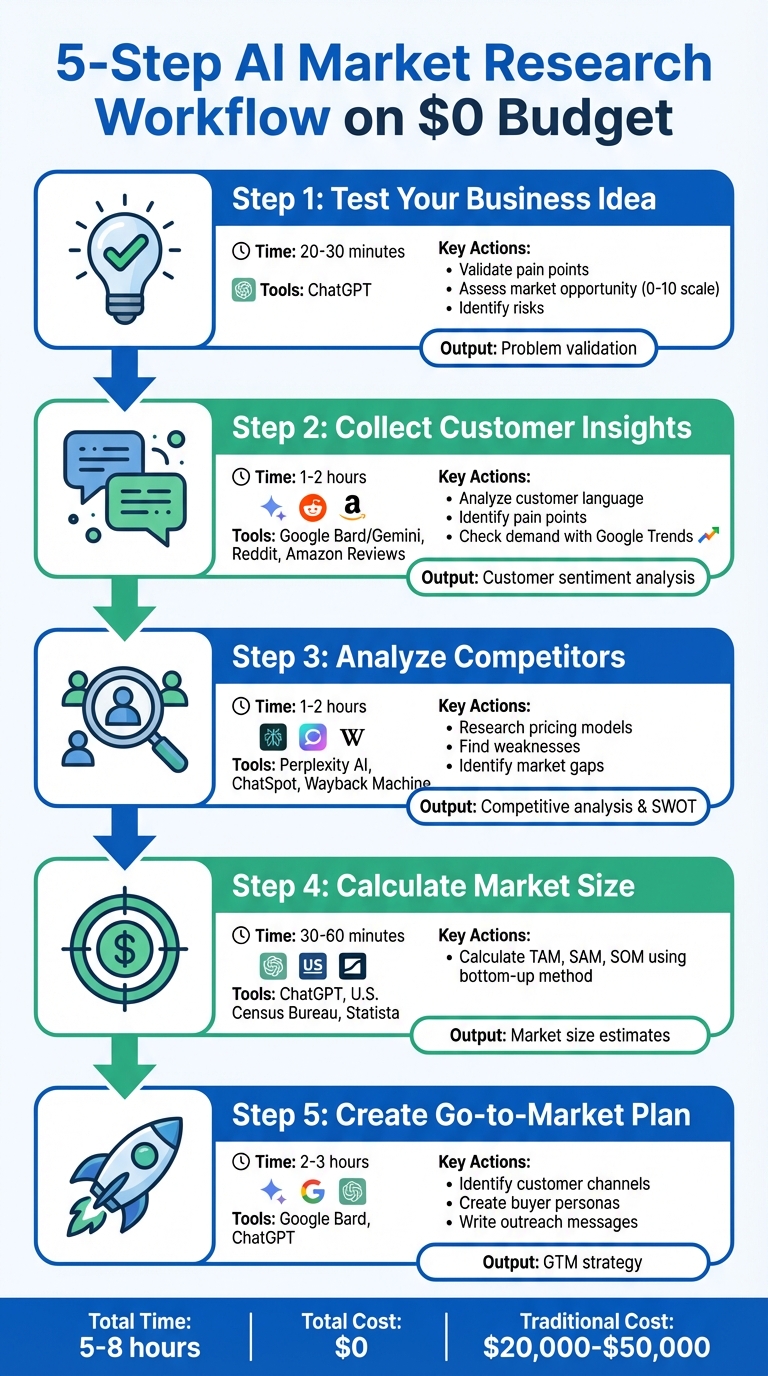
5-Step AI Market Research Workflow Using Free Tools
How to Conduct Market Research with AI (Full Tutorial)
Step 1: Test Your Business Idea with Free AI Tools
Before diving into a new business venture, it's essential to ensure your idea tackles a real, pressing problem. Free AI tools can help you do this in just 20–30 minutes, saving you weeks of manual research. The trick lies in asking the right questions and guiding the AI to provide expert-level insights instead of generic suggestions.
Let’s explore how ChatGPT can help uncover customer pain points and identify market opportunities.
Using ChatGPT to Find Customer Problems
Start by customizing ChatGPT’s persona to act as a seasoned market researcher or financial expert. This approach encourages the AI to deliver more detailed and insightful responses.
"ChatGPT can be a tremendous assistant to marketers - and not just for writing copy. One of my favorite ways to put the AI chatbot to work is by getting it to help me do all the behind-the-scenes foundational work." - Althea Storm, B2B SaaS Writer
Here’s a prompt to get started: "Critically assess my business idea: [Your Concept]. Analyze market opportunity (0-10), major risks, and why it might fail. Provide an honest assessment." This helps identify weaknesses early in the process.
Next, determine if the problem is something customers are willing to pay to solve. Use this follow-up: "How painful is this problem (1-10)? Are people actively seeking solutions or just complaining?".
For additional insights, analyze public forums for recurring complaints. Enable ChatGPT’s browsing feature and ask: "What are the top 5 recurring complaints people have on Reddit regarding [Your Industry/Product]?". In minutes, the AI will summarize patterns, giving you a clear picture of customer frustrations.
"The best way to get the most out of GPT's analytical and research ability is by building on an existing answer till you explore the detailed depths." - Will Yang, Head of Growth and Marketing, Instrumentl
By iterating your prompts, you can dig deeper and uncover valuable insights about your target audience.
Finding Early Opportunities in New Markets
Once you've validated the problem, shift your focus to spotting untapped opportunities. Ask the AI: "Identify market gaps and opportunities.". This can reveal missing features or underserved customer groups that your business could target.
To ensure your idea aligns with future market trends, try this prompt: "Analyze relevant trends for my idea: [Concept] in the [Industry] over the next 3-5 years. Research growing vs. declining trends and consumer behavior shifts. Is this idea riding waves or fighting them?". This approach helps you avoid investing in a concept that’s losing relevance.
Always ask the AI to cite sources for any data it provides, and double-check key statistics manually. As of early 2026, platforms like OpenAI offer free access to advanced models with "Deep Research" modes capable of generating comprehensive reports from a single prompt. However, it’s still crucial to verify the information yourself.
"Think of AI as your research buddy - it brings you the data, but you still need to connect the dots." - Vinay Kevadiya, Founder and CEO, Upmetrics
Step 2: Collect Customer Insights Using Free AI
Once you've validated your business idea, it's time to dig deeper into how customers describe their challenges. The words they use can reveal frustrations that traditional surveys often miss. To get this raw, unfiltered feedback, focus on platforms where people openly share their thoughts.
The best sources for this kind of insight? Forums, reviews, and social media platforms like Reddit, Amazon reviews, TikTok, and G2. These platforms are goldmines for discovering the emotions and specific complaints that customers express in their own words - without the polished tone you’d find in a survey response.
"Surveys are like watching a tiger at the zoo... Reddit [is] that same tiger in the wild. You're not getting the rehearsed version. You're getting instincts, emotion, and raw truth." - Michael Brito, Global Head of Data + Intelligence, Zeno Group
This step takes your idea validation to the next level by diving into real customer sentiment.
Using Google Bard to Analyze Customer Language
Start by gathering customer feedback from forums and review sites. Tools like Web Scraper.io or Instant Data Scraper can help you extract comment threads quickly, saving you from manually copying and pasting. You can also use Google's site search feature to find specific discussions - try something like site:reddit.com [your product category] complaints to zero in on relevant threads.
Once you’ve collected the data, analyze it using Gemini. As of 2026, Gemini offers a free tier with "Deep Research" mode, which can process large volumes of text to identify patterns. For example, you might prompt it with: "Summarize the top recurring complaints in these reviews" or "Group these into themes: product improvement and customer service issues".
Michael Brito from Zeno Group tested this approach in May 2025 with Vuori Meta Pants. He pulled reviews from Reddit and Vuori.com, then used Claude AI for topic modeling. Within minutes, the AI highlighted specific pain points like "inseam length accuracy", "sizing inconsistency", and "calf tightness" - small but meaningful frustrations that pointed to broader issues. Insights like these can shape your marketing messages and even guide product updates.
The key here is to capture the exact language customers use. If they say "calf tightness" instead of "uncomfortable fit", that’s the phrasing you should use in your messaging. AI tools can quickly cluster these patterns, saving you hours of manual analysis. These insights are invaluable for refining your market positioning and product messaging.
Checking Market Demand with Public Data
After analyzing customer language, the next step is to confirm that these issues reflect a larger demand.
Start with Google Trends. Search for keywords related to your product category and look for "breakout" terms - these signal increasing interest before the topic becomes mainstream. If search volume is flat or declining, it might indicate weak demand.
Next, use Answer the Public to uncover common customer questions. The free version allows one search per day, which is enough to identify long-tail questions you can address. To dig deeper, you can ask Gemini: "What are the most common questions people ask about [your industry] based on current search data?". This helps connect customer language to actual market demand.
For stronger validation, look for recurring themes across multiple platforms. If the same complaint shows up on Reddit, Amazon reviews, and YouTube comments, it’s worth prioritizing based on how often it appears and the intensity of the feedback. Use AI tools like Gemini or ChatGPT to analyze these threads by asking: "Identify recurring themes under three categories: Motivations, Pain Points, and Emotional Triggers".
Finally, always verify AI-generated insights by reviewing the original sources. Tools like Perplexity AI provide clickable citations, making it easy to fact-check and ensure your data is accurate and up-to-date.
| Tool | Best Use Case | Free Tier Limit |
|---|---|---|
| Gemini | Analyzing customer language & deep research | Unlimited basic use |
| Browse AI | Scraping Reddit/LinkedIn comments | Limited free credits |
| Answer the Public | Identifying customer questions | 1 search/day |
| Perplexity AI | Real-time fact-checking with citations | 5 Pro searches/day |
| Google Trends | Tracking search volume & rising terms | Unlimited |
Step 3: Analyze Competitors Without Paid Tools
Now that you’ve identified customer pain points, it’s time to dig into what your competitors are doing. The goal? Understand their strategies, spot their weaknesses, and figure out how you can stand out in the market.
"One hour of competitive analysis can save you days or weeks of product development and iteration." - Lior Grossman, Parallel Entrepreneur
This step focuses on using free AI tools to uncover competitor strengths and find opportunities to differentiate your business.
Researching Competitor Strategies with Perplexity AI
Start by identifying your competitors. Tools like ChatSpot can generate a list of top competitors based on your product description. If you’re still in the planning phase and don’t have a website, Competely can analyze your industry using a simple description.
Once you know who your competitors are, dive deeper with Perplexity AI. This tool can help you gather real-time data on pricing models, customer complaints, and more. For example, you can ask questions like:
"What pricing model does [Competitor Name] use?" or "What are the most common complaints about [Competitor Name]?" Perplexity includes clickable citations, so you can verify the information easily.
Need a detailed SWOT analysis? Use Gemini’s Deep Research mode. Simply ask it to "Create a SWOT analysis for [Competitor Name] based on customer reviews and market performance". In just minutes, it will outline strengths, weaknesses, opportunities, and threats - saving you hours of manual research.
To understand how competitors have evolved, the Wayback Machine is a powerful tool. It lets you view archived versions of their website, revealing shifts in messaging or pricing. For example, if a competitor has moved from promoting "affordable" solutions to targeting enterprise clients, it might signal an underserved market you can tap into.
Another smart move? Track hiring trends on LinkedIn. A sudden surge in hires for enterprise sales roles could indicate a strategic pivot months ahead. Similarly, if they’re hiring heavily for customer success roles, it could point to high churn - a potential weakness you can address by offering better support.
Finding Gaps in the Market
Once you’ve analyzed competitor strategies, shift your focus to finding market gaps by identifying their weaknesses.
Start by examining customer complaints. Use tools like Browse AI or Instant Data Scraper to pull reviews from platforms like Trustpilot, G2, or Reddit. Feed these reviews into ChatGPT or Gemini with a prompt like:
"List the top 5 customer pain points for [Competitor Name] and the corresponding business opportunities."
For instance, if users complain about "hidden fees", you could emphasize your upfront, transparent pricing.
Reddit is another goldmine for spotting gaps. Search for posts with phrases like "[Competitor Name] doesn’t support [Feature]" or "How do I do [Task] in [Competitor Tool]?" AI tools can summarize these discussions, helping you identify recurring themes. If multiple users mention a missing feature, it’s a clear opportunity to address that need.
Another effective method is to map competitors on a price-versus-quality grid. ChatGPT or Gemini can help you create this visual. If most competitors are clustered as either low-cost/low-quality or high-cost/high-quality, there may be room for a mid-tier option that balances affordability and performance.
Lastly, keep an eye on emerging players using resources like Google Patents, AngelList, and Crunchbase. If a startup has recently raised funding to solve a similar problem, spotting it early can help you adjust your approach before they gain traction.
| Tool | Best Use Case for Competitor Research |
|---|---|
| Perplexity AI | Real-time web browsing and sourcing specific competitor activities |
| ChatSpot | Instantly generating a list of top 10 competitors |
| Browse AI | Scraping structured data from Reddit or LinkedIn without coding |
| Wayback Machine | Analyzing historical changes in pricing and positioning |
| Gemini Deep Research | Generating comprehensive SWOT analyses in 5–20 minutes |
sbb-itb-08dd11e
Step 4: Calculate Market Size Using Free AI Tools
Knowing your market size is essential for deciding whether your business idea is worth pursuing. Investors typically focus on three key metrics: Total Addressable Market (TAM), Serviceable Addressable Market (SAM), and Serviceable Obtainable Market (SOM). Here's a quick breakdown:
- TAM: The total revenue opportunity if you captured 100% of the market.
- SAM: A portion of TAM that you can realistically target based on geography or business model.
- SOM: The slice of SAM you can realistically capture, factoring in competition.
"Early-stage (pre-Series-B) startups shouldn't worry too much about calculating a precise TAM... investors care a lot more about the traction you can show with paying customers. That's why bottom-up is far more convincing than hand-wavy top-down methods." - Rob Cheng, Founder and Startup Marketing Advisor
Free AI tools like ChatGPT and Gemini can help you calculate these numbers. However, since AI can sometimes provide outdated or inaccurate data, it's critical to verify findings. Once you've validated your idea and gathered customer insights, the next logical step is estimating the market's overall size.
Estimating Market Size with ChatGPT
For startups, the bottom-up method is often the most convincing to investors. The formula is simple: multiply the total number of potential customers by your average annual revenue per customer.
Here’s an example: Suppose you're launching a project management tool in the U.S. that costs $50/month. You can ask ChatGPT: "How many U.S. small businesses with 10–50 employees exist?" If the tool estimates 2,000,000 businesses, your TAM would be:
2,000,000 × $600 (annual fee) = $1.2 billion annually.
To calculate SAM, refine your audience. You might ask: "What percentage of these businesses are in the Midwest and actively use cloud-based software?" If ChatGPT estimates 20%, your SAM becomes $240 million. For SOM, consider a realistic market capture - early-stage companies often capture 1–5% of SAM. If you aim for 2% in three years, your SOM would be:
$240 million × 2% = $4.8 million.
AI tools like ChatGPT or Gemini can also analyze structured data. For example, you could upload an S-1 filing from a competitor and ask, "What is this company's annual revenue and market share?" If the competitor reports $500 million in revenue with a 10% market share, you can estimate the total market size at $5 billion. Gemini's Deep Research mode can even generate detailed market size breakdowns with citations.
This approach shows how to use AI for bottom-up calculations, helping you lay the groundwork for a focused go-to-market strategy.
| Metric | Definition | Example ChatGPT Prompt |
|---|---|---|
| TAM | Total potential market | "Estimate the total addressable market for project management software globally." |
| SAM | Reachable market | "What portion of the project management market is reachable for small businesses in North America?" |
| SOM | Realistic market share | "Based on Asana's market share, what is a realistic SOM for a new entrant in the first three years?" |
Verifying AI Results with Public Information
AI-generated estimates are a great starting point, but always cross-check with reliable public sources. For example:
- U.S. Census Bureau: Use it to confirm demographic data and business counts. If ChatGPT estimates 2,000,000 small businesses with 10–50 employees, verify this figure in the Census Bureau's database.
- Statista: Provides industry-specific revenue reports and growth projections, which can validate your TAM estimates.
- SEC EDGAR Filings: For competitor-based calculations, review 10-Q reports to verify market share and revenue figures.
- BuiltWith: Helps identify how many companies use specific technologies, aiding in bottom-up calculations.
- Google Trends: Use it to check search demand for relevant keywords. If AI suggests strong market interest, confirm this by analyzing search trends.
"Industries also change so quickly that TAM calculations can become irrelevant within a matter of months." - James Oliver, Founder, Oliver.com
Since markets evolve rapidly, treat your calculations as dynamic estimates. Update them quarterly using fresh data and combine AI insights with manual verification. This approach ensures your market size projections are both accurate and credible - critical for building trust with investors.
Step 5: Create a Go-to-Market Plan Using AI
After validating your idea and estimating your market size, the next step is figuring out how to reach your customers. Free AI tools can play a big role here, helping you identify where your audience spends time online and how to craft messages that resonate. This step turns your research into actionable strategies for outreach.
Finding Customer Channels with Google Bard
AI tools like Google Bard can help you discover where your target audience is most active online. For instance, if you're introducing a project management tool for small businesses, you might ask: "Where do small business owners with 10–50 employees discuss productivity challenges?" Google Bard could point you to LinkedIn groups, Reddit communities like r/smallbusiness, or niche industry forums.
You can also use AI to analyze competitor channels. Try asking, "Create a table of the top five project management tools, including their website URLs and social media handles."
Another way to refine your strategy is by building detailed buyer personas. For example, you could ask ChatGPT: "Create a buyer persona for a 35-year-old operations manager at a 20-person agency, detailing key pain points and content preferences." The AI might reveal that this persona prefers long-form LinkedIn articles over short videos, giving you a clear direction for your content strategy.
"ChatGPT can be a tremendous assistant to marketers - and not just for writing copy. One of my favorite ways to put the AI chatbot to work is by getting it to help me do all the behind-the-scenes foundational work that goes into great marketing."
- Althea Storm, B2B SaaS Writer
If AI suggests platforms like Reddit, take the time to manually explore those communities. Look for active discussions and use tools like Google Trends to confirm the popularity of suggested keywords. AI recommendations are a great starting point, but your own research ensures accuracy and relevance.
Once you've identified your channels, the next step is creating targeted outreach messages.
Writing Outreach Messages with ChatGPT
Generic outreach doesn't work. AI can help craft messages tailored to your audience by analyzing their pain points and motivations. Start by feeding ChatGPT real data from customer surveys or reviews. For example, you might say: "Based on these survey responses, write a cold email for small business owners frustrated with overly complex project management tools."
To elevate your messaging, you can ask ChatGPT to emulate a specific expert's style. For example, try: "Act as Seth Godin and write a 100-word LinkedIn message targeting operations managers who struggle with team collaboration." This often results in more compelling and refined content.
Refining your messaging is an iterative process. Begin with a broad question like, "What are the top three pain points for small business owners using project management software?" Then narrow it down with prompts like, "Write three email subject lines addressing the pain point of 'too many features.'" This approach lets you test different angles efficiently.
To keep AI-generated content concise and actionable, use clear constraints in your prompts. For instance, you might specify: "No introductory sentence. Start with 'When I…' and keep it under 50 words." This helps eliminate unnecessary fluff and produces copy that's closer to being ready for use. Always review and adjust the messaging based on real customer feedback.
| Outreach Task | Recommended AI Tool | Sample Prompt Strategy |
|---|---|---|
| Buyer Personas | ChatGPT / Google Bard | "Create a buyer's persona highlighting demographic details, needs, and pain points." |
| Email Sequences | Google Bard | "Create a 5-email sequence for leads who downloaded [lead magnet] with a direct tone." |
| Ad Hooks | Google Bard | "Give me 20 headline variations for a 15-second reel targeting [segment]." |
| Positioning | ChatGPT | "Draft 3 positioning statements and identify key differentiators for each." |
When Free Tools Aren't Enough
Free AI tools are fantastic for early validation and basic research, but they do have their limits. Knowing when those limits are reached can save you from making decisions based on incomplete or incorrect information.
Free Tools vs. Paid Platforms
The key differences between free and paid tools boil down to accuracy, depth, and scale. Free AI models can sometimes "hallucinate", confidently presenting false information as fact. Noah Parsons, COO at Palo Alto Software, explains it clearly:
"To state the obvious, you'd never want fictional market data in your business plan. You wouldn't want to misrepresent your business opportunity to investors, and you certainly can't afford to build a business based on inaccurate data."
This sentiment is echoed by Future Business Academy:
"Free tools deliver 60-70% of the value of paid tools at 0% of the cost. Paid versions deliver the remaining 30-40% of the value, plus convenience, speed, and support."
Free tools also come with usage caps. For instance, ChatGPT restricts the number of messages during peak hours, while Otter.ai limits free users to 300 minutes of transcription per month - equivalent to about 5–6 hours of meetings. If you hit these limits regularly, it’s likely time to upgrade.
Here’s a quick comparison of free tools versus paid platforms:
| Feature | Free AI Tools | Paid Platforms (e.g., IdeaFloat) |
|---|---|---|
| Data Accuracy | Higher risk of errors; often lacks citations | Verified sources with "Deep Research" modes |
| Usage Limits | Strict daily/monthly caps | Higher or unlimited usage |
| Research Depth | Basic summaries; limited context | Comprehensive analysis of large datasets |
| Privacy | Data may be used for training models | Enterprise-grade protections and opt-outs |
| Time Investment | 40–60 hours for manual validation | Automations save 20+ hours |
These differences highlight why scaling research often requires moving beyond free tools.
Where Free Tools Fall Short
Free tools shine in early-stage tasks like testing ideas, drafting outreach, or spotting market trends. But as your needs grow, their limitations in efficiency and data verification become more apparent.
For example, manually reviewing thousands of customer reviews with a free tool can take 6–8 hours, while a paid platform can complete the same task in 30 minutes. Similarly, conducting Reddit-based market research might take 8–10 hours manually, but automation can cut that down to just 1 hour.
Privacy is another concern. Free tools often use your data to improve their models unless you opt out, which can be risky if you’re handling sensitive business information like financial projections or customer data.
Upgrading makes sense when manual research becomes a bottleneck. A good rule of thumb: if a free tool saves you 3+ hours per week, and the paid version could save an additional 2 hours, the upgrade is likely worth it. Multiply your hourly rate by the time saved, and compare that to the subscription cost - if the savings exceed the expense, it’s a smart move.
Lastly, free tools often fall short when it comes to verification. They may provide outdated or incorrect information, like listing competitors that no longer exist or citing inaccurate market sizes. Paid platforms like IdeaFloat offer live, verifiable data, ensuring your decisions are based on reliable, up-to-date information.
Conclusion
This approach not only helps validate ideas but also significantly cuts down on research time and expenses. Use ChatGPT to identify customer pain points and opportunities. Leverage Google Bard to analyze language patterns and confirm demand with publicly available data. Map out your competitive landscape with Perplexity AI, estimate market size using free AI tools alongside government data, and craft your go-to-market strategy with AI-generated channel plans and outreach messages.
Each step builds on the last, creating a robust market strategy by integrating insights from earlier research. Thanks to free AI tools, solo founders now have access to insights that used to require budgets of $20,000–$50,000, while slashing research time from 40–60 hours to just a few hours. As Riten Debnath, Founder of Fueler, wisely states:
"The future belongs to those who use data wisely - so get ahead and lead the way".
Always double-check AI-generated insights with real-world data, especially for key figures like market size or competitor analysis. Use role-playing prompts to refine AI outputs, combine multiple tools for a comprehensive perspective, and start small by automating one high-friction task at a time.
As your research evolves and manual tasks become bottlenecks, advanced platforms can take your workflow to the next level. When free tools hit their limits, solutions like IdeaFloat can provide rapid, verified insights - analyzing thousands of reviews in just 30 minutes or reducing Reddit research from 8–10 hours to just 1 hour.
Start with one idea, validate one assumption, and explore the possibilities of AI - all without spending a dime.
FAQs
How can I make sure AI-generated market research data is accurate?
Accuracy starts with using reliable AI tools specifically designed for market research. These tools are built to gather and organize data efficiently, but their output isn't flawless. That’s why critical evaluation is key.
To verify the insights, cross-check them with multiple sources or tools. Relying on just one AI model might lead to biased or incomplete results. Human oversight also plays a big role here - review the data to ensure it makes sense in context. AI can sometimes produce information that sounds right but isn’t.
For the best results, combine AI-generated findings with expert analysis. This approach refines the data, making it more accurate and actionable for decision-making.
What challenges should I expect when using free AI tools for market research?
Free AI tools can be a handy resource for market research, but they aren’t without their drawbacks. One major concern is the possibility of inaccurate or biased data. These tools often rely on training datasets that may be incomplete or skewed, which can lead to misleading insights or unreliable conclusions.
Another issue is the risk of AI hallucinations - a phenomenon where the tool generates information that seems credible but is entirely incorrect or fabricated. This can be particularly problematic when accuracy is critical. Moreover, AI tools often fall short in areas requiring human judgment, such as interpreting complex contexts, understanding emotions, or navigating the subtleties of market dynamics. These are areas where human expertise remains indispensable.
Free AI tools can be excellent for identifying trends and conducting secondary research. However, for dependable and well-rounded results, it’s crucial to pair these tools with human analysis and insight.
How can I move from free AI tools to more advanced solutions when my needs grow?
Transitioning from free AI tools to more advanced platforms often comes down to recognizing when your needs outgrow what free options can provide. Start by pinpointing the gaps - maybe you're looking for deeper competitor analysis, real-time data updates, or more precise market segmentation. When these limitations become apparent, it might be time to explore paid platforms that offer the advanced features and scalability your work now demands.
A practical way to approach this is by using free tools for basic research and to test initial ideas. As your projects grow or require more complex insights, you can gradually incorporate paid solutions. This step-by-step approach helps you make the most of free tools while carefully deciding when and where to invest. By aligning these upgrades with your business goals, you can scale your efforts effectively without unnecessary spending.
Related Blog Posts
- 5 Essential Tools for Assessing A Market Size
- I Validated My Business Idea in 24 Hours - Here's The Exact Process
- Idea to First Customer in 14 Days: Scripts, Templates, Checklist
- Idea to Numbers: The 20-Minute Profit Check