
The virtual assistant (VA) industry is growing fast, with the market projected to reach $20–25 billion by 2026. Businesses increasingly rely on VAs to save time, cut costs, and focus on growth. Here's what you need to know:
- Specializations: VAs are no longer just for admin tasks. Popular niches include real estate, Amazon FBA, digital marketing, healthcare, and social media management. Specialized VAs earn 20–50% more due to their skills.
- Rates: U.S.-based VAs charge $15–$100+ per hour depending on expertise. Offshore VAs cost $5–$35 per hour. Most tasks fall in the $25–$75/hour range for specialized roles.
- Efficiency: SOPs (Standard Operating Procedures) are key to getting the most out of your VA. Clear instructions save time, reduce errors, and improve productivity by up to 60%.
- ROI: 72% of businesses see a positive ROI within three months of hiring a VA, with leaders reporting 33% higher revenue growth when delegating effectively.
Hiring a VA can save you up to 25 hours per week. The real value lies in choosing the right specialization, understanding rates, and using well-documented SOPs to streamline workflows.
How to Operate a Successful Virtual Assistant Business
sbb-itb-08dd11e
Popular Virtual Assistant Specializations
The virtual assistant (VA) industry has evolved significantly, branching out from general administrative tasks into specialized roles that demand higher rates - often 20%–50% more - due to their direct impact on business growth. For example, by 2026, nearly half of businesses will outsource digital marketing tasks, while 39% of real estate agencies will depend on VAs for lead generation. This trend highlights the growing demand for professionals skilled in industry-specific tools, workflows, and regulations. These niche VAs not only save time but also help businesses create effective standard operating procedures (SOPs).
Specialized VAs are particularly valuable for tackling time-intensive tasks. A real estate agent, for instance, could spend 15 hours a week updating MLS listings or making cold calls - time better spent meeting clients. Similarly, Amazon sellers manually updating product listings lose opportunities to focus on sourcing profitable inventory. These examples underscore how specialization drives efficiency and influences rate structures and SOP development.
"Virtual assistants are no longer just 'outsourced help.' They've become an extension of in-house teams." - Wishup
Geography and regulations also shape demand for specialized VAs. For instance, healthcare VAs must adhere to HIPAA compliance, while e-commerce VAs require expertise in platforms like Amazon Seller Central or Shopify. Meanwhile, the rise of "AI-skilled" VAs - those proficient with AI tools to speed up tasks - has created a new premium tier. Additionally, Eastern European VAs are gaining popularity among U.S. businesses, thanks to high literacy rates and overlapping time zones.
| Specialization | Key Tools & Platforms | Business Contribution |
|---|---|---|
| Real Estate | MLS, Zillow, HubSpot CRM | Saves 15+ hours/week for agents to close deals |
| Amazon FBA | Amazon Seller Central, Shopify | Optimizes listings and boosts conversions |
| Digital Marketing | SEMrush, Google Analytics, Mailchimp | Drives cost-effective lead generation |
| Medical | Practice Fusion (EHR), Telehealth apps | Reduces billing errors, ensures compliance |
| Social Media | Canva, Buffer, Hootsuite | Builds brand consistency and engagement |
Real Estate Virtual Assistants
Real estate VAs handle the behind-the-scenes tasks that keep agents competitive. Their responsibilities include updating MLS listings, generating leads, making cold calls, and managing CRMs. By taking care of these operational duties, they free up agents to focus on closing deals. Offshore real estate VAs typically charge between $15 and $25 per hour, while U.S.-based professionals range from $25 to $45 per hour.
Proficiency in tools like Zillow, MLS software, and HubSpot CRM is essential. Beyond technical skills, these VAs often manage appointment scheduling, coordinate property tours, and maintain detailed databases of client preferences, requiring excellent communication and organizational abilities.
Amazon FBA Virtual Assistants
For Amazon sellers, staying on top of product listings, inventory, and customer service is critical - but also time-consuming. Sixty-four percent of e-commerce brands now rely on VAs to handle these tasks. Amazon FBA VAs specialize in maintaining consistent store performance and improving customer retention, which directly impacts seller ratings and Buy Box eligibility.
Their day-to-day tasks include optimizing product listings with keyword-rich content, monitoring inventory to avoid stockouts, managing customer inquiries, and processing returns. Expertise in Amazon Seller Central is a must. Offshore Amazon FBA VAs charge $12–$20 per hour, while U.S.-based counterparts typically command $30–$50 per hour.
Digital Marketing and SEO Virtual Assistants
Digital marketing VAs are instrumental in driving growth through tasks like SEO audits, keyword research, email campaign management, and monitoring PPC campaigns. With 48% of businesses outsourcing digital marketing to VAs, this specialization is in high demand. These professionals use tools like SEMrush, Google Analytics, and Mailchimp to deliver results.
Their work includes on-page SEO optimization, backlink building, creating email sequences, and running A/B tests on landing pages. Increasingly, businesses expect them to be skilled in AI tools like ChatGPT for drafting content and Zapier for automating workflows.
"Our Elite Assistant has been a true game-changer for our team. She's detail-oriented, manages tasks with precision, and communicates proactively." - Tony Do, Senior Marketing Manager, HubSpot
Offshore digital marketing VAs charge $15–$30 per hour, while U.S.-based professionals range from $30 to $60 per hour.
Medical and Healthcare Virtual Assistants
Healthcare VAs play a key role in patient scheduling, insurance verification, medical billing, and ensuring HIPAA compliance. The rise of telehealth has further increased demand for professionals skilled in EHR platforms and familiar with HIPAA guidelines. Currently, 29% of healthcare providers, including telehealth clinics, employ VAs for patient coordination.
These VAs use tools like Practice Fusion and telehealth apps to verify insurance, process billing codes, and manage patient records. Their work is critical for maintaining compliance and improving cash flow. Offshore healthcare VAs typically charge $20–$35 per hour, while U.S.-based professionals range from $35 to $65 per hour.
Content and Social Media Virtual Assistants
Content and social media VAs are essential for businesses aiming to maintain a strong online presence. They handle tasks like creating content calendars, scheduling posts, engaging with followers, and editing multimedia. By managing these responsibilities, they allow business owners to focus on other priorities.
Using tools like Canva, Buffer, and Hootsuite, these VAs research trending topics, craft engaging captions, and analyze audience metrics. Social media management continues to be one of the most sought-after VA specializations, as consistent engagement builds trust and community. Offshore content and social media VAs charge $10–$20 per hour, while U.S.-based professionals range from $20 to $40 per hour.
Next, we’ll explore how these specialized roles influence pricing standards in the VA industry.
Virtual Assistant Pricing Standards
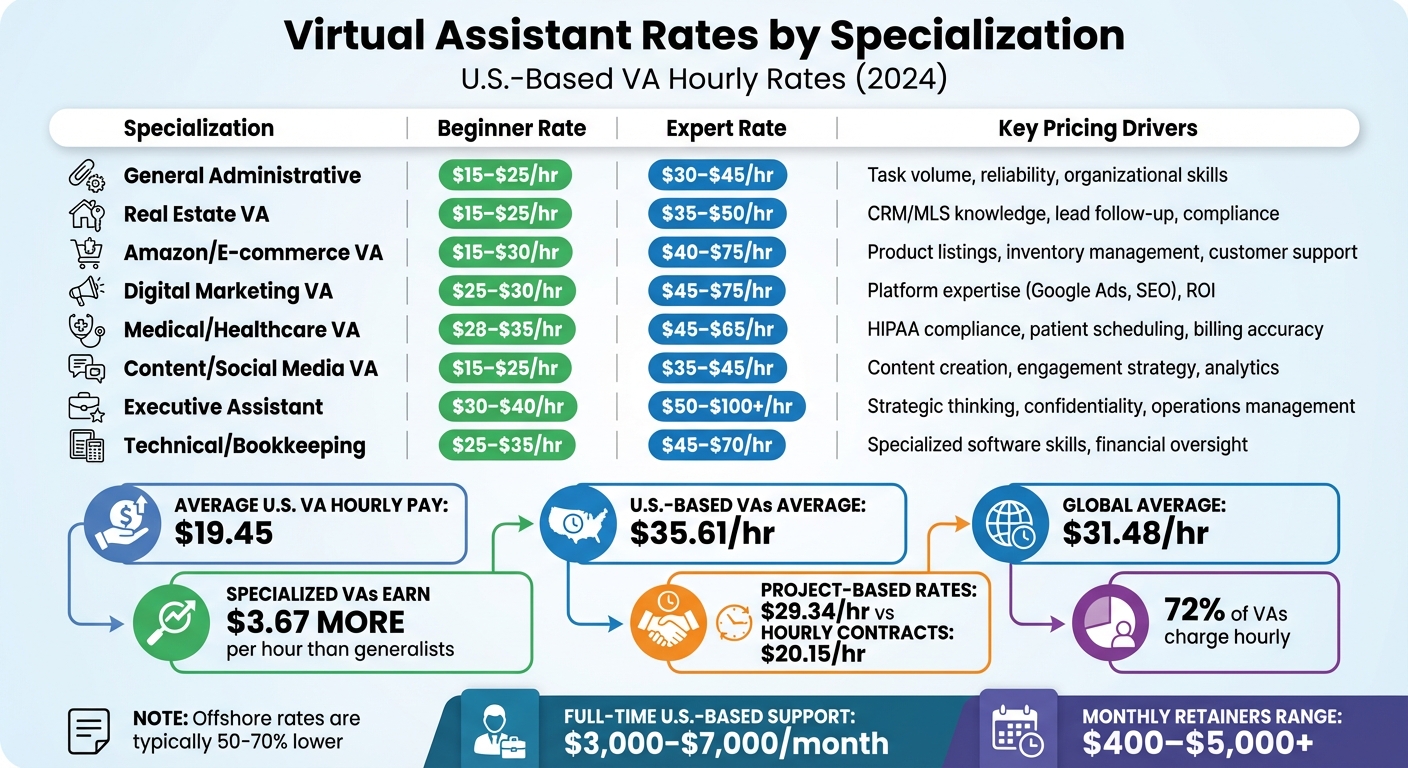
Virtual Assistant Rates and Specializations Comparison 2024
As the demand for specialized virtual assistants (VAs) grows, pricing reflects their expertise and the value they bring. Understanding VA rates is crucial for setting budgets and hiring effectively. In the U.S., the average hourly pay for a VA is $19.45. U.S.-based VAs typically earn $35.61 per hour, compared to the global average of $31.48. Specialized VAs tend to earn about $3.67 more per hour than generalists, which adds up to roughly $587 extra per month for full-time work.
Pricing models also play a big role. A majority (72%) of VAs charge hourly, but project-based work often commands higher rates - around $29.34 per hour, compared to $20.15 per hour for hourly contracts. Some VAs work on monthly retainers, which can range from $400 to over $5,000, depending on their skills and hours committed. For full-time U.S.-based support, costs typically fall between $3,000 and $7,000 per month.
"The cheapest hourly rate frequently results in the highest Total Cost of Ownership once management time, turnover, and quality control are accounted for."
It’s also essential to consider the Total Cost of Ownership (TCO). Beyond hourly rates, factors like recruitment, onboarding, software costs, and turnover add to the TCO. For instance, hiring a VA at $30/hour with 20 hours of training introduces an initial $600 "hidden" cost before any core tasks are completed.
The demand for specialized skills is pushing rates higher. Executive assistance services saw an 18% year-over-year increase, while digital marketing VA demand grew by 30%. As VAs evolve from administrative helpers to strategic partners, their work is increasingly seen as an investment in business growth.
What Affects Virtual Assistant Rates
Several factors influence VA pricing. One of the most significant is task complexity. Basic tasks like email management or calendar scheduling are on the lower end of the scale, while specialized services - such as SEO audits, medical billing compliant with HIPAA, or optimizing Amazon listings - command higher rates [4,6].
Experience level is another key factor. Entry-level VAs generally charge 30–50% less than experienced professionals, who work more independently and deliver faster results. Expert VAs, who charge $40–$75+ per hour, often anticipate business needs and require minimal oversight [4,6].
"A well-trained virtual assistant can save you up to 20 hours a week - time you can reinvest into growth, strategy, or simply breathing."
- Evan Walther, Oceans Talent
Geographic location also impacts rates. U.S.-based VAs tend to cost more due to higher living expenses and better cultural alignment. Offshore VAs from countries like the Philippines or India charge less, typically between $5 and $20 per hour, but may face challenges with time zones and communication. Latin American VAs offer a middle ground, with rates ranging from $15 to $35 per hour and overlapping working hours.
The engagement model you choose further affects pricing. Hiring through freelance platforms may have lower upfront costs but requires time for screening and vetting. Agency-managed services, while 20–40% more expensive, handle quality control, payroll, and provide backup coverage.
VAs offering strategic insights and independent decision-making command premium rates. For tasks requiring problem-solving or project management, expect to budget between $35 and $75 per hour.
Rate Comparison by Specialization
To summarize, here’s a breakdown of typical U.S.-based VA rates by specialization and experience:
| Specialization | Beginner Rate (U.S.) | Expert Rate (U.S.) | Key Pricing Drivers |
|---|---|---|---|
| General Administrative | $15–$25/hr | $30–$45/hr | Task volume, reliability, organizational skills |
| Real Estate VA | $15–$25/hr | $35–$50/hr | CRM/MLS knowledge, lead follow-up, compliance |
| Amazon / E-commerce VA | $15–$30/hr | $40–$75/hr | Product listings, inventory management, customer support |
| Digital Marketing VA | $25–$30/hr | $45–$75/hr | Platform expertise (e.g., Google Ads, SEO), ROI |
| Medical/Healthcare VA | $28–$35/hr | $45–$65/hr | HIPAA compliance, patient scheduling, billing accuracy |
| Content/Social Media VA | $15–$25/hr | $35–$45/hr | Content creation, engagement strategy, analytics |
| Executive Assistant | $30–$40/hr | $50–$100+/hr | Strategic thinking, confidentiality, operations management |
| Technical/Bookkeeping | $25–$35/hr | $45–$70/hr | Specialized software skills, financial oversight |
While these rates reflect U.S.-based VAs, offshore rates can be 50–70% lower. However, this often comes with trade-offs in time zone coordination and communication. Many businesses now use a hybrid model, combining a U.S.-based VA for critical tasks with offshore support for routine administrative work.
To determine the value of hiring a VA, compare their rate to your own effective hourly rate (calculated by dividing your annual income by annual work hours). For instance, if your time is worth $75/hour and you hire a VA at $25/hour, you save $50 for every hour of work they take off your plate.
How to Create Standard Operating Procedures (SOPs) for Virtual Assistants
Clear and well-thought-out SOPs can make all the difference when it comes to getting the most out of your virtual assistants. These procedures turn chaotic workflows into streamlined systems. In fact, businesses with documented processes see a 20% boost in productivity, and companies that use SOPs are 21% more likely to maintain operational efficiency. When you're paying a VA $25–$75 per hour, every minute saved with a solid SOP directly impacts your bottom line.
"Having clear step-by-step processes in your business builds a strong base that helps your team grow and succeed with confidence."
- Paul Urwin, CFO, There is Talent
The most effective SOPs aren't written from memory - they're created on the spot. Recording your screen while performing a task and narrating each step ensures you capture small but important details, like where to click, what a good result looks like, and how to handle tricky situations.
Before finalizing, run a "No-Clue test." Hand the SOP to someone unfamiliar with the task and watch where they struggle. This helps identify unclear steps and prevents endless back-and-forth clarification later.
Store all SOPs in a centralized, searchable location, such as Google Drive or Notion. Use consistent names for files and review SOPs regularly - at least every three months or whenever tools or processes change. Always include a "Last Updated" date to keep things current.
Core Components of an Effective SOP
A great SOP starts with a clear objective - a short explanation of what the task achieves and why it matters. Without this context, a VA might follow the steps but miss the bigger picture. Next, lay out roles and responsibilities, specifying who handles the task, who approves the final result, and who to contact if something goes wrong.
List all tools and resources upfront, such as software, login URLs, file paths, and naming conventions. Avoid including sensitive details like passwords; instead, use a secure password manager.
The backbone of an SOP is its step-by-step instructions. Break tasks into small, manageable steps using numbered lists and simple language. For example, instead of saying "Optimize the Amazon listing", detail the process:
- Research competitor keywords using Helium 10.
- Update the product title with the top three keywords.
- Rewrite bullet points to include secondary keywords.
Add visual aids like screenshots or screen recordings to clarify tricky steps.
Wrap things up with a quality assurance checklist. Define what "done" looks like - whether it's "All links tested and working", "No typos", or "Client approval received via email." Include a troubleshooting section to guide the VA through common issues and provide contact info for support. Finally, note the expected time for completing the task to help with scheduling and spotting inefficiencies.
| SOP Format | Best For | Pros | Cons |
|---|---|---|---|
| Written Documents | Simple, text-based tasks | Easy to search and print | Can be misinterpreted; may feel tedious |
| Visual Guides | Design or UI-heavy tasks | High clarity; easy to follow | Updating screenshots can take time |
| Video/Screen Recordings | Complex software workflows | Captures nuances and tone | Hard to skim for specific steps |
| Checklists | Recurring, high-frequency tasks | Quick verification; avoids missed steps | Lacks depth for new hires |
Steps to Write Virtual Assistant SOPs
To create practical SOPs, start by prioritizing which tasks to document first. Rate tasks based on how often they occur, how frustrating they are, and how well-documented they currently are. Focus on high-frequency, high-frustration tasks with poor documentation.
Pick the right SOP format for each task. Use step-by-step instructions for simple, repetitive tasks like invoicing. For more complex processes, like running an SEO campaign, try a hierarchical SOP with linked sub-procedures. If the task involves conditional logic (e.g., "If the customer requests a refund, do X; if they want an exchange, do Y"), a flowchart might work best.
Document tasks in real time. This approach helps you capture every detail and refine the process as you go. For text-based SOPs, work backward from the final deliverable to identify all necessary steps.
Involve your team in the process. The people who perform these tasks daily know where the bottlenecks and confusion happen. Collaborating with them ensures the SOPs are accurate and practical.
In 2021, consulting firm Sweat+Co boosted profitability by 20% through time tracking and standardized processes. Business Consultant Dax Kimbrough used Toggl Track to document workflows and adjust strategies based on the data.
"The key to freedom in your business is your ability to delegate... This is why knowing how to properly delegate and create standard operating procedures (SOPs) is critical for your future."
- Jeff J Hunter, Founder, VA Staffer
Implementing SOPs can result in a 30% improvement in efficiency by reducing downtime and improving work quality.
SOP Examples by Specialization
Amazon FBA Virtual Assistant SOP Example
The goal here is straightforward: improve product listings to enhance both search visibility and conversion rates on Amazon.
Start with keyword research using Helium 10. Open the tool, choose the product category, and export a list of relevant keywords. Then, update the product title by integrating the highest-volume keywords. Move on to the bullet points - rewrite them to naturally incorporate secondary keywords while focusing on product benefits. For images, ensure all photos meet Amazon's resolution standard of 1080x1080px. Once verified, upload them to Seller Central.
A QA checklist is essential for quality control. Use it to confirm image resolution and ensure bullet points include the necessary keywords. The SOP also includes decision-making guidelines, like: "If inventory drops below 50 units, notify the manager immediately via Slack." This empowers the VA to take initiative while staying aligned with operational goals. Annotated screenshots of Seller Central steps are included to assist VAs who are new to the platform.
This structured approach not only improves efficiency but also provides clarity, ensuring tasks are completed accurately and on time.
Digital Marketing Virtual Assistant SOP Example
This example shows how structured SOPs can elevate digital marketing tasks. Start with platform-specific guidelines: write conversational captions for Instagram, including pre-approved hashtags, while LinkedIn posts should maintain a professional tone without hashtags. Use Meta Business Suite to schedule posts consistently, following the campaign's content calendar.
The content calendar workflow is broken down into clear steps. Access the "Social Media Assets" folder, select approved images, and draft captions that align with the brand’s voice. Always include a call-to-action (CTA), such as "Link in bio" or "Comment below." Before scheduling, run a QA checklist to proofread captions for errors, confirm images meet the 1080x1080px resolution, and verify that a CTA is present.
The SOP also establishes engagement rules: check notifications regularly, like all comments, and respond to inquiries within two hours using the approved response guide. For escalations - like complaints or refund requests - the VA tags the manager in Slack immediately.
"SOPs give your social team the clarity they need to do their best work. When everyone knows exactly what 'great' looks like, you get consistency, stronger content, plus a workflow that supports creativity instead of slowing it down."
- Alexus Brittain, Social Media Manager, Vista Social
The SOP also includes emergency protocols: if negative feedback arises, pause scheduled content and notify the team immediately. These detailed steps ensure VAs can handle tasks efficiently while contributing to business growth and maintaining brand reputation.
Summary
The virtual assistant (VA) industry has grown well beyond simple administrative tasks. By 2026, VAs with specialized skills are earning 20%–50% higher rates thanks to their ability to deliver faster, more targeted results. Whether it’s managing Amazon listings, generating leads for real estate, or scaling digital marketing efforts, the right VA specialization can directly influence your business's success.
Understanding industry rates is crucial for budgeting and calculating ROI effectively. Basic administrative tasks typically cost between $8 and $25 per hour, while technical specialists command rates ranging from $30 to $85 per hour. Businesses can reduce operating costs by 30%–78% compared to hiring full-time employees. Additionally, 72% of companies report seeing a positive ROI within just three months when they integrate VAs into well-structured systems.
The financial benefits of hiring a VA are amplified when supported by strong standard operating procedures (SOPs). These clear guidelines streamline workflows, cut down on errors, and improve efficiency by up to 60% within the first three months.
Timing is another critical factor in maximizing the value of a VA. Experts recommend hiring when your business earns $100,000 to $200,000 annually or when administrative tasks take up more than one-third of your time. Start by delegating repetitive, low-risk tasks and documenting processes early. This approach allows you to reclaim valuable time and focus on growing your business.
FAQs
How do I choose the right VA niche for my business?
To find the right virtual assistant (VA) niche, start by assessing your skills, interests, and experience. Pinpoint areas where you're not only skilled but also genuinely enjoy working. Some popular and in-demand niches to explore include social media management, digital marketing, and administrative support.
When narrowing down your options, consider niches that offer strong growth opportunities and align with your financial goals. Think about factors like client budgets, competition levels, and how your pricing strategy fits into the market. Matching your abilities with what clients are actively seeking can set you up for long-term success and consistent growth.
What’s the best way to price a VA - hourly, project, or retainer?
When deciding on the best pricing model for a virtual assistant (VA), it’s all about what fits your business needs. Hourly rates give you flexibility - you only pay for the time worked. However, they might make budgeting less predictable. On the other hand, project-based pricing or retainer agreements offer steadier income and clearer profitability. Think about your workload and budget to pick the model that ensures a smooth and efficient partnership.
What should I include in an SOP so my VA can work independently?
To ensure your virtual assistant (VA) can work effectively and independently, it's important to provide clear, detailed instructions for each task. Break tasks into step-by-step guides, list the tools and resources they’ll need, and clearly define the expected results.
Set clear expectations for response times and establish communication protocols to avoid confusion. Adding visuals, like screenshots or flowcharts, can make instructions easier to follow.
Make it a habit to review and test your standard operating procedures (SOPs) regularly, updating them as needed to keep them relevant and efficient. Finally, store these SOPs in an easily accessible location so your VA can reference them whenever necessary, promoting both consistency and autonomy in their work.
Related Blog Posts
- 27 Side Hustles That Are Actually Profitable in 2025
- The Most Profitable Service Businesses You Can Start From Home in 2025
- Build a Business That Runs Without You: Systems, SOPs, Delegation
- Which Small Business Is Most Profitable? Real Margins by Niche