Want to publish your first book on Amazon? This guide breaks down everything you need to know about using Amazon KDP (Kindle Direct Publishing) to go from idea to your first sale. With zero upfront costs, KDP lets you publish eBooks, paperbacks, and hardcover books that Amazon prints on demand. Here's what you'll learn:
- How to find profitable niches using tools like IdeaFloat and Amazon's Best Seller Rank (BSR).
- Step-by-step publishing process: Setting up your KDP account, formatting your book, and creating an eye-catching cover.
- Optimizing your book's visibility: Using keywords, categories, and pricing strategies to attract readers.
- Promotion tips: From Amazon ads to leveraging reviews and social media.
Whether you're creating a journal, novel, or planner, this guide simplifies the process so you can publish and start earning royalties. Ready to turn your idea into a book? Let’s dive in!
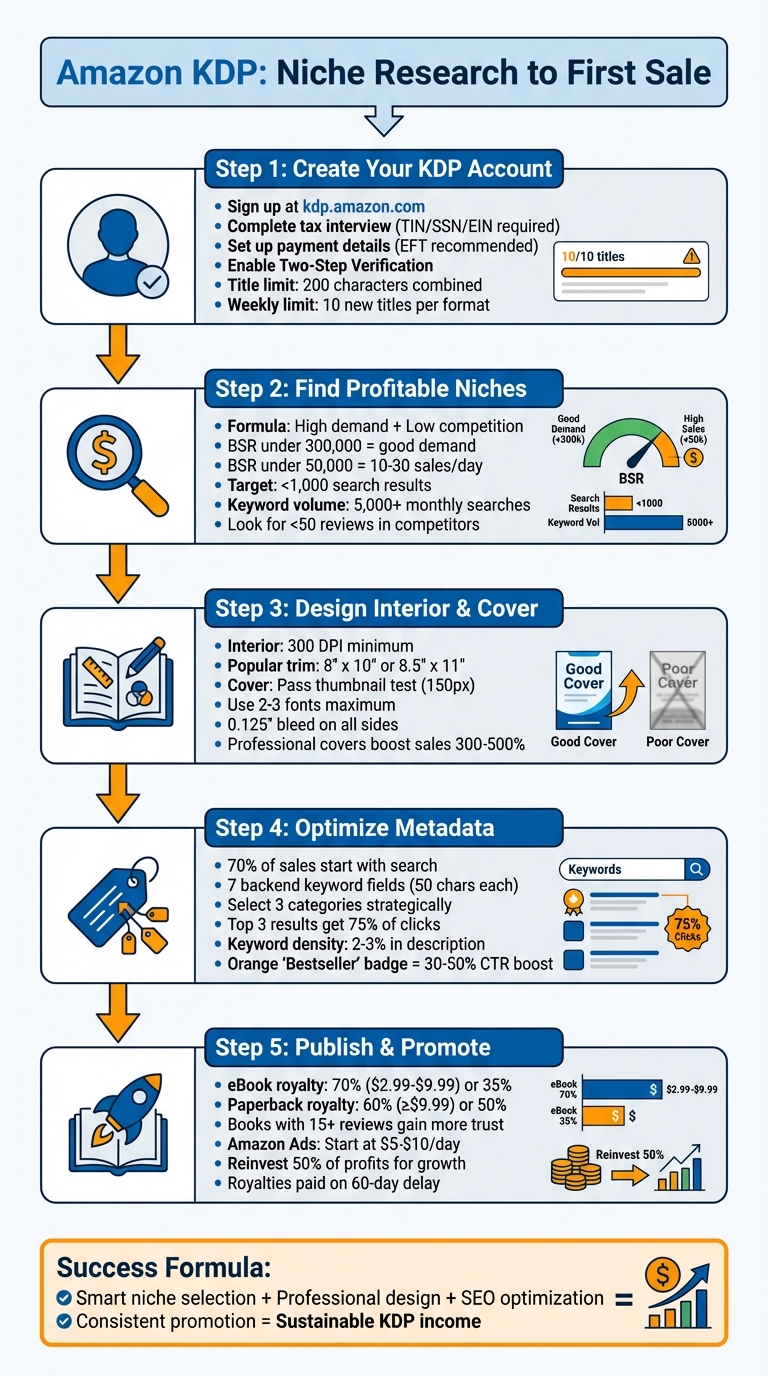
Amazon KDP Publishing Process: 5 Steps from Niche Research to First Sale
Step 1: Create Your Amazon KDP Account
How to Sign Up for KDP
To get started, head over to kdp.amazon.com and click either "Sign up" or "Join KDP." You can use your existing Amazon account or create a brand-new one for publishing. Using your current Amazon account is often easier since it simplifies ordering proof and author copies later on.
Once signed in, you'll need to provide some key details: your author or publisher information, payment details, and tax data. For U.S.-based authors, this means entering your bank account number, routing number, and opting for EFT (Electronic Funds Transfer) for quicker payments without thresholds.
Before publishing, complete the tax interview. You'll need a Taxpayer Identification Number (TIN) - this could be your Social Security Number (SSN) if you're an individual or an Employer Identification Number (EIN) if you're operating as a business. Amazon will validate this information, and once you earn at least $10 in royalties in a calendar year, they'll issue a 1099-MISC form for tax reporting.
Make sure to register with your legal name, as it needs to match your tax and banking records. If you're planning to use a pen name, you can add it later. You'll also need a physical mailing address (PO Boxes aren't accepted) and a mobile phone number for Two-Step Verification, which helps secure your account and earnings.
Amazon may also request identity verification, asking you to upload photos of a government-issued ID. Once everything is approved, you'll have access to the KDP dashboard, where you can manage your books, monitor sales, and explore marketing tools.
Before diving into publishing, take a moment to familiarize yourself with Amazon's content guidelines. Ensuring your work aligns with their rules is essential for a smooth publishing process.
Amazon's Content Rules You Need to Know
Adhering to Amazon's content rules is crucial for maintaining a professional listing and keeping your account in good standing.
First, your book’s title and subtitle must match the cover exactly, with a combined character limit of 200. Avoid generic keywords like "journal" or "notebook", promotional phrases such as "bestselling" or "free", and any use of trademarked terms without proper authorization.
Your book description should steer clear of including phone numbers, email addresses, URLs, reviews, or any time-sensitive promotions. Instead, focus on accurate keywords and categories that genuinely reflect your book's content. Avoid misleading terms or referencing other authors. Categories should align directly with your book's main theme.
Amazon strictly prohibits content that includes hate speech, child exploitation, pornography, glorification of rape or pedophilia, or advocacy of terrorism. If you're publishing low-content books like notebooks, be aware that these aren't eligible for free KDP ISBNs and can't be included in a "Series" collection.
Before publishing, use the Launch Previewer tool to carefully review every page for formatting and print quality issues. Keep in mind that many details, such as your primary author name and book title, cannot be changed after publication. Additionally, KDP enforces a limit of 10 new titles per book format each week.
sbb-itb-08dd11e
Step 2: Find Profitable Niches Using Data
Using IdeaFloat's Problem Validator and Consumer Insights
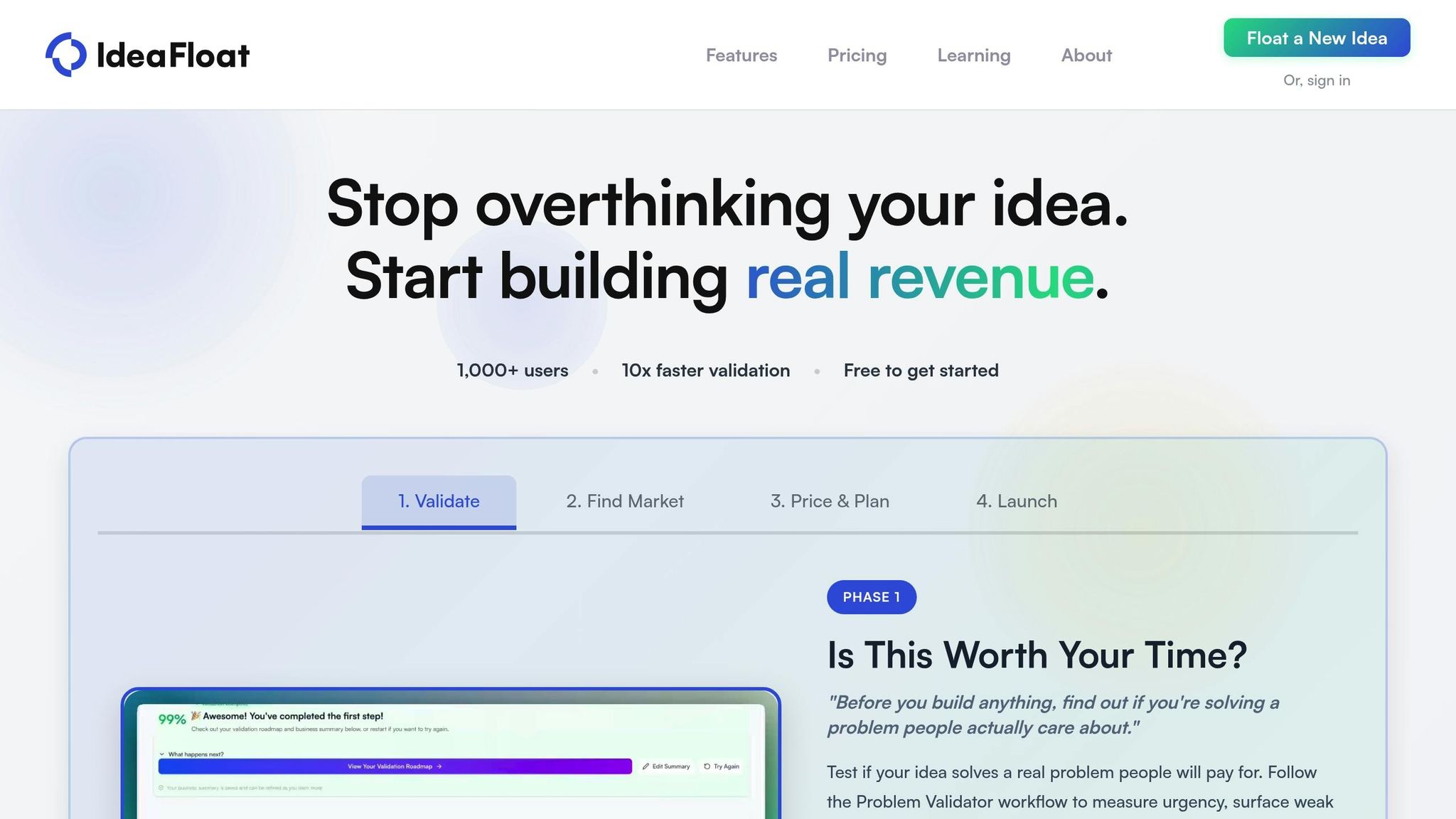
Once your KDP account is ready, the next step is finding a niche that can actually make money. This is where data becomes your best friend. Tools like IdeaFloat's Problem Validator help you pinpoint customer problems that your book can solve. By analyzing urgency and demand signals, you can ensure your idea addresses a real need.
After identifying a potential issue, use Consumer Insights to dig deeper. This tool scans online conversations to uncover how people talk about their challenges. For instance, if you're thinking about creating a journal for adults with ADHD, Consumer Insights can show you the exact frustrations people have with staying organized, giving you a clearer picture of what your audience needs.
The formula for success? High demand + low competition. To measure demand, check Amazon's Best Seller Rank (BSR). If at least three books on the first page of a niche have a BSR below 300,000, that’s a promising sign. For context, a BSR of 50,000 or lower typically means a book is selling 10 to 30 copies daily.
How to Analyze Competition and Find Market Gaps
To stand out in a crowded market, you need to understand your competition. IdeaFloat's Competitor Analysis can help by mapping out competitors and revealing untapped opportunities. It highlights both strengths and weaknesses, so you can position your book more effectively.
When analyzing Amazon competition, use an incognito browser window to avoid skewed search results. Look for niches with fewer than 1,000 search results - this often signals low competition. Also, focus on niches where several books have a BSR under 300,000 and fewer than 50 reviews. These are signs of low competition and strong potential.
Customer reviews are a goldmine for spotting gaps in the market. Common complaints or unmet needs in top-selling books can guide you in addressing those pain points in your own work. Additionally, aim for keywords with at least 5,000 monthly searches to ensure your niche has enough interest.
"A niche with 10,000 desperate buyers beats a niche with 1 million casual browsers. Urgency and specificity trump audience size every time." - Inkfluence AI
Examples of Profitable Book Niches
Finding the right niche often means narrowing your focus. Instead of creating a generic "Journal", try something more specific like "Mindfulness Journals for Single Dads" or "Dyslexia-Friendly Activity Books". Here are some niches with strong potential for beginners:
| Niche Example | Competition Level | Demand Level | Target Price Range |
|---|---|---|---|
| Large Print Activity Books (Seniors) | Low | Growing | $8.99 – $14.99 |
| Gratitude & Mindfulness Journals | Medium | Very High | $9.99 – $16.99 |
| Specialized Planners (Meal/Budget) | Medium | High | $11.99 – $19.99 |
| Pet Care Logs & Trackers | Low | Growing | $7.99 – $13.99 |
Some niches are particularly promising. For example, ADHD planners have a search volume of 13,279 with fewer than 2,000 competing products. Shadow work journals are another great option, with a search volume of 7,958 and under 1,000 competitors. Large print activity books for seniors also stand out, often commanding premium prices at the higher end of their range.
On the flip side, avoid oversaturated niches like generic password logbooks, simple lined notebooks, and basic adult coloring books. These categories often require heavy advertising to gain visibility. To maintain healthy profit margins, aim for a retail price of $8.99 or higher, factoring in printing costs.
With a validated niche in hand, you're ready to start designing your book’s interior and cover.
Step 3: Design Your Book Interior and Cover
How to Create Interiors for Low-Content Books
The interior of your book needs to meet readers' expectations, and the design process varies based on the type of book you're creating. For low-content books like journals, planners, or coloring books, tools such as Canva or PowerPoint work well. These platforms allow you to design repetitive pages and export them as "PDF Print" with the Flatten PDF option to lock your design layers in place.
When formatting, calculate the width of each interior page using this formula:
(FULL COVER WIDTH – SPINE WIDTH) ÷ 2. This ensures your pages align with Amazon's specifications. Popular trim sizes for planners and workbooks include 8″ x 10″ or 8.5″ x 11″.
For high-content books like novels or nonfiction, download official KDP templates for Microsoft Word. These templates help you set up margins, gutters, and trim sizes correctly from the start. Before formatting, clean your manuscript by using "Find & Replace" to remove tabs and double spaces. Then, apply serif fonts like Garamond, Georgia, or Times New Roman at 11–12 pt, with justified alignment and 1.15–1.25 line spacing. Enable mirror margins so the inside margin (gutter) is wider than the outside margin, and ensure chapters start on right-hand pages using "Section Breaks (Next Page)".
"Great formatting is invisible to readers – they only notice when it's done poorly." – Elite Typesetting
For advanced tools, Atticus offers lifetime access for $147 and handles both eBook and print formatting. Alternatively, Kindle Create is a free option for simple eBooks and basic print books. Keep in mind that print books require a print-ready PDF with embedded fonts, while eBooks need to be formatted as EPUB files. If your book includes images, ensure they are at least 300 DPI to avoid pixelation.
A polished interior not only satisfies readers but also helps turn your effort into steady sales. Once your interior is ready, it’s time to focus on creating a cover that grabs attention.
How to Design a Cover That Sells
Your book cover is your most powerful sales tool. In fact, over 70% of readers base their purchasing decision primarily on the cover. A poorly designed cover can make even the best content go unnoticed.
"Your cover is your best salesperson. In a saturated market, a mediocre design is invisible." – Danyer Acuña Cifre, Market Analyst at Amazon KDP
Start with the thumbnail test: shrink your cover to about 150 pixels wide - the size of a thumb on a phone screen. If the title isn’t legible or the genre isn’t clear, adjust the contrast or font size. Readers often decide within seconds whether a cover catches their eye.
For DIY cover design, Canva is a popular choice. It provides user-friendly templates and tools for non-designers. To ensure technical accuracy, use the KDP Cover Calculator to determine exact dimensions based on your trim size, page count, and paper type. Keep in mind, cream paper is thicker than white paper, which affects the spine width even if the page count remains the same.
Here are the key technical requirements for your cover:
- Minimum resolution: 300 DPI
- Bleed: 0.125″ on all sides, with critical elements kept within a 0.125″ safe zone
- File format: RGB mode (Amazon converts it to CMYK automatically)
- Spine text: Only included if your book has at least 79 pages
Stick to 2–3 fonts to maintain a clean visual hierarchy. Use one font for the title, another for the subtitle, and a third for the author’s name. Also, follow genre-specific design cues. For example, thrillers often use dark colors and bold sans-serif fonts, while romance covers lean toward warm tones with serif or script fonts.
| Genre | Recommended Colors | Typography Style |
|---|---|---|
| Business/Self-Help | Blue (trust, professionalism) | Clean Sans-serif |
| Thriller/Mystery | Red, Black (urgency, drama) | Bold Sans-serif |
| Romance | Red, Pink, warm tones (passion) | Serif or Script |
| Wellness/Nature | Green (growth, health) | Clean, organic fonts |
Don’t forget to reserve a 2″ x 1.2″ blank white rectangle in the lower right corner of the back cover for Amazon’s automated ISBN barcode. Investing in a professional design can significantly boost sales - by as much as 300% to 500% compared to amateur designs. If design isn’t your strength, hiring a freelance designer (starting around $50) can be a smart move that pays off through higher conversion rates.
COMPLETE Amazon KDP Tutorial for Beginners 2026 (4 Hours)
Step 4: Optimize Keywords, Categories, and Listings
Your book's design and content won't matter if readers can't find it. Here's a staggering fact: 70% of all Amazon purchases start with a search, and books on page one of search results grab over 90% of the clicks. This step is crucial - it’s what determines whether your book gets noticed or lost in the sea of millions of titles.
"Keywords are the hidden engine behind every successful KDP book. While your cover catches eyes and your description sells, it's your keywords that determine whether shoppers ever find your book in the first place." – Danielle Okonkwo, Marketing & Growth Lead, KDPEasy
Amazon's A10 algorithm uses your book's metadata - like the title, subtitle, and backend keywords - to match it to relevant search queries. With the right keywords, you'll appear in front of buyers actively searching for books like yours.
How to Choose Effective Keywords
Amazon KDP provides seven backend keyword fields, each with a 50-character limit, giving you 350 characters in total[28, 52]. These fields are invisible to buyers but critical for indexing. Use them wisely by filling them with terms readers are actually searching for.
Start by using Amazon's autocomplete feature. Open an incognito browser, go to Amazon, and type your main topic into the search bar under "All" or "Kindle Store." Amazon will suggest real-time popular search terms. For example, if you're publishing a gratitude journal, typing "gratitude journal" might bring up suggestions like "gratitude journal for women 2025" or "gratitude journal with prompts." These long-tail keywords are more specific and often easier to rank for than broader terms.
Next, dive into competitor reviews. Look at the top-selling books in your niche and read their customer feedback. Pay attention to recurring phrases like "easy to follow", "no cliffhanger", or "slow burn." These are often the exact terms your audience is searching for. Tools like IdeaFloat's Unique Value Proposition feature can help identify impactful keywords by analyzing customer language patterns.
When filling out your backend keyword fields, avoid repeating words already in your title or subtitle - Amazon indexes those automatically[28, 55]. Also, separate words with spaces, not commas, to make full use of the 50-character limit. For example, instead of writing "gratitude, journal, women", write "gratitude journal women daily prompts mindfulness."
Finally, validate your keywords by checking the Best Seller Rank (BSR) of the top 10 results for each term. If multiple books have a BSR under 50,000, it means buyers are actively purchasing from that search term. Also, keywords with fewer than 1,000 search results in the "All" category are considered low competition, giving you a better chance of ranking on page one.
| Keyword Type | Examples | Purpose |
|---|---|---|
| Primary Subgenre | "post-apocalyptic romance", "cozy witch mystery" | Defines the core "aisle" of the store |
| Tropes/Themes | "enemies to lovers", "found family", "slow burn" | Matches specific reader cravings |
| Audience/Use-Case | "for seniors", "gift for new moms", "beginners" | Targets specific buyers or recipients |
| Setting/Tone | "Colonial America", "dystopian", "feel-good" | Clarifies the story's atmosphere |
Avoid prohibited terms like other authors' names, brand names, or subjective claims such as "best seller" or "free." Violating these rules can lead to account suspension[28, 55].
How to Pick the Right Categories
Once your keywords are optimized, refining your book's categories is the next step to boost visibility. Categories act like digital shelves, determining where your book appears in Amazon's browse structure[56, 58]. Amazon KDP allows you to select up to three categories during setup, and choosing wisely can significantly impact your discoverability[56, 57].
"Categories aren't just digital filing cabinets. They're the lifeline of discoverability on Amazon." – Micheal Adams, Author, BookQuill
Amazon uses BISAC (Book Industry Standards and Communications) codes, combined with your title, description, and keywords, to decide your final placement. Aim for precise subcategories (e.g., Fiction > Romance > Historical > Victorian) rather than broad categories like "Romance"[56, 58].
Before locking in your categories, check the BSR of the #100 book in each category you're considering. This gives you a sense of the competition. For instance, if the #100 book has a BSR under 5,000, you might need over 100 sales per day to rank in the top 100. On the other hand, if the #100 book's BSR is over 50,000, just 1 to 5 daily sales might suffice.
| BSR of #100 Book | Competitiveness Level | Estimated Sales Needed/Day |
|---|---|---|
| Under 5,000 | Extremely Competitive | 100+ |
| 5,000 - 20,000 | Competitive | 20 - 50 |
| 20,000 - 50,000 | Moderate | 5 - 15 |
| Over 50,000 | Easy | 1 - 5 |
A smart approach is to pick one competitive category for credibility and one niche category where you can realistically rank in the top 20. Ranking in the top 100 of any category earns you an orange "Bestseller" badge, which can boost click-through rates by 30% to 50%.
To find the right categories, analyze successful books in your niche. Check their product pages for the "Product Details" section or breadcrumb trail, which reveals their subcategories. Another strategy is to start in low-competition categories to gain momentum and reviews, then shift to more competitive ones once you’ve built social proof. You can update categories anytime through the KDP dashboard, with changes taking 24 to 72 hours to reflect[56, 57].
How to Write a Book Description That Converts
With keywords and categories optimized, your book description becomes the final piece of the discoverability puzzle. It has two jobs: attract buyers and boost your book's search ranking. Since over 70% of Amazon book sales come from search queries, your description must work hard on both fronts.
Start with a compelling hook in the first 2–3 sentences. Use your primary keyword naturally and immediately highlight the main benefit or emotional pull of your book. For example, instead of saying, "This is a book about gratitude", try, "Discover how 5 minutes of daily gratitude can transform your mindset and reduce stress - starting today."
"Your book description serves two purposes: converting browsers into buyers and boosting SEO." – KDP Builder
Follow a proven structure: Hook, Features, Benefits, Social Proof, and Call-to-Action (CTA). After grabbing attention with your hook, list key features using bullet points (formatted with HTML tags like <ul> and <li>). Then explain the benefits - how your book solves a problem or enhances the reader's life. Include endorsements or awards for credibility. Finally, close with a clear CTA, such as "Scroll up and click 'Buy Now' to start your journey today."
For SEO, aim for a keyword density of 2–3%. In a 300-word description, this means using your primary keyword naturally about 6 to 9 times. Use HTML formatting to make your description easy to scan - bold text and bullet points help avoid the dreaded "wall of text" look[61, 54].
"If clicks arrive without sales, a description, cover, or 'look inside' might miss the mark." – Brandon Rohrbaugh, Author and Strategy Consultant
Step 5: Publish Your Book and Make Your First Sale
You’ve done the prep work - fine-tuned your metadata, designed your book, and picked the right keywords. Now it’s time to publish, price, and make that all-important first sale.
How to Upload Your Book to Amazon KDP
Start by logging into your KDP Bookshelf and clicking "+ Create." Fill in your book’s details, including the title, subtitle, author name, and description. After that, choose your publishing rights, add backend keywords, and select your primary categories.
When it comes to the manuscript section, you’ll need to decide whether to use a free KDP ISBN or purchase your own. For eBooks, upload your manuscript as an EPUB, KPF, or DOCX file and include a JPEG or TIFF cover. For paperbacks, upload a PDF manuscript and a print-ready PDF cover. Don’t forget to select "Bleed (PDF Only)" if your design elements or images extend to the edge of the page. You’ll also need to choose print options like ink type, paper type, trim size, and cover finish.
Starting in 2025, KDP requires you to disclose whether your book’s content - text, images, or translations - was generated using AI during the upload process.
Before hitting publish, use the Launch Previewer to check for formatting issues. If you’re publishing a print book, ordering a proof copy is a smart move to confirm alignment and color accuracy. Once satisfied, set your territories (usually "All territories"), select a royalty plan, set your list price, and click "Publish Your Book." Amazon typically reviews submissions within 72 hours, after which your book will go live.
One crucial tip: make sure the author name and title in your manuscript match exactly with your KDP entries. This ensures your eBook and paperback versions are linked properly.
"Self-publishing through KDP and Amazon has changed my life. My books have made it to the New York Times, USA Today, and Wall Street Journal bestseller lists." – Tricia O'Malley, Author
With your book live, the next step is setting the right price to maximize your profit.
How to Price Your Book for Profit
Your book’s price plays a big role in both visibility and profit. For eBooks, Amazon offers two royalty tiers: 70% for books priced between $2.99 and $9.99, and 35% for books outside that range. Keep in mind that the 70% tier includes a delivery fee of $0.15 per megabyte, so reducing file size can increase your profit.
For paperbacks, Amazon’s 2025 royalty structure gives you 60% of the list price (minus printing costs) if your book is priced at $9.99 or higher. For books below $9.99, the royalty rate drops to 50%. To calculate your earnings, use this formula:
(List Price x Royalty Rate) – Printing Costs
Printing costs include a fixed charge and a per-page fee.
Start by researching the top 20 competitors in your niche to find the median price. If you’re new, pricing your book 10–20% below the median can help attract readers. Established authors, on the other hand, might price 10–20% above it. In late 2025, books priced between $2.99 and $4.99 had 34% higher conversion rates compared to those priced at $0.99–$1.99. Additionally, using “.99” endings (like $3.99) can boost sales by 8–12%.
A proven strategy for series is the "loss-leader" model: price the first book low (between $0.99 and $2.99) to draw readers in, then price sequels higher (typically $3.99–$4.99). You can also use KDP Select’s Countdown Deals to temporarily lower prices while keeping the 70% royalty rate. If you’re unsure about pricing, try a 4-week A/B test: start at $2.99 in Week 1, increase to $3.99 in Week 2, then $4.99 in Week 3, and analyze which price generates the most revenue.
| Genre | 2025/2026 Optimal Price Range |
|---|---|
| Romance | $2.99–$3.99 |
| Thriller / Mystery | $3.99–$4.99 |
| Sci-Fi / Fantasy | $3.99–$5.99 |
| Business / Self-Help | $4.99–$9.99 |
| Children's Books | $2.99–$4.99 |
| Non-Fiction / How-To | $5.99–$9.99 |
Once your price is set, it’s time to focus on promotion.
How to Promote Your Book and Get Sales
Publishing is just the first step - promotion is what gets your book into readers’ hands. Start 4–6 weeks before your launch by building an email list of 50–100 subscribers and distributing 10–20 Advance Review Copies (ARCs). Email marketing can be more effective than social media, so prioritize it.
Once your book is live, optimize for Amazon SEO. Since around 70% of sales come from Amazon searches, include your primary keyword in your title and fully utilize backend keyword slots. Use the "Request a Review" button in your KDP dashboard and add a polite review request in your book’s back matter. Books with 15 or more reviews tend to gain more trust from potential buyers.
For paid promotion, Amazon Sponsored Products is a strong option. Target competitor ASINs with Bestseller Ranks under 50,000, bid $0.30–$0.50 per click, and set a daily budget between $5–$10. Keep an eye on performance: if a keyword gets over 20 clicks without a sale, pause it. Increase bids for keywords with a low advertising cost of sales (ACoS) under 70%.
For free promotion, take advantage of KDP Select tools like Kindle Countdown Deals and Free Book Promotions (available for up to 5 days every 90 days) to boost downloads and rankings. On social media, platforms like TikTok (BookTok) and Instagram (Bookstagram) are great for sharing "page-flip" videos or showing your book in action. Simple, authentic videos featuring physical copies in readers’ hands often lead to organic sales.
"I've sold over 2 million copies of my book... It is one of the best decisions I've ever made, as it has enabled me to impact millions of lives while providing financial security for my family." – Hal Elrod, Author
Finally, keep in mind that Amazon KDP pays royalties on a 60-day delay. For example, sales made in September will be paid out in November. In January 2026 alone, Amazon disbursed $65.6 million in KDP Select Global Fund royalties, proving that consistent promotion and smart pricing can turn a single sale into a steady income stream.
Conclusion: Turn Research Into Sales
You’ve done it all - from setting up your KDP account to making that first sale. Now it’s time to turn what you’ve learned into a steady stream of income. Success on Amazon KDP doesn’t happen by accident. It’s built on smart, data-backed decisions, consistent effort, and patience.
The key? Put these strategies into action. Make keyword research an ongoing priority. If your Best Seller Rank (BSR) plateaus after 30 days, experiment with fresh keyword combinations. Remember, the top three search results grab 75% of all clicks. Stay competitive by frequently updating your metadata using KDP Reports, which refresh every 15 minutes.
"Keywords get you discovered, but quality keeps readers buying." – BookBloom
But keywords alone won’t carry you. Your books must genuinely address readers’ needs. Tools like IdeaFloat’s Problem Validator and Consumer Insights can help you uncover underserved niches, especially those where top-ranking books have fewer than 500 reviews. These gaps are golden opportunities for a standout book. Pay close attention to metrics like Click-Through Rate (CTR) and Conversion Rate to identify areas for improvement. If your cover or description isn’t converting clicks into sales, try A/B testing to find what resonates. Every tweak - whether in niche selection or keyword strategy - brings you closer to building a sustainable publishing business.
Don’t forget to reinvest in growth. Many successful publishers allocate around 50% of their profits to scaling efforts like advertising. Start small - Amazon Ads can run on a daily budget as low as $3 - and expand as you discover what works. Diversify your offerings by turning successful eBooks into paperbacks, hardcovers, or audiobooks to reach new audiences. Build a direct connection with readers by including QR codes in your books to grow an email list for future releases. Publishing more books also opens doors for cross-promotion, creating a snowball effect for your income.
"KDP publishing rewards patience and persistence. Applying these strategies consistently will help you build an eco-friendly publishing business." – SellerSprite
Your first sale is just the start. Keep researching, keep optimizing, and keep publishing. The authors who thrive on Amazon KDP are those who treat it like a business - one that grows through thoughtful, data-driven choices.
FAQs
What’s the fastest way to validate a KDP niche before I write anything?
The fastest way to check if a KDP niche is worth pursuing is by using niche research tools. These tools help you evaluate three key factors: demand, competition, and buyer intent. The goal? To find niches where readers are actively spending money on books. This way, your time and energy go toward opportunities that are more likely to generate profit.
How do I know if my book price will stay profitable after printing costs?
To keep your book price profitable, it's crucial to understand how Amazon KDP calculates printing costs. These costs include a fixed base fee plus a per-page rate, which varies depending on your book's format and dimensions.
Amazon offers a handy tool, the Print Cost Calculator, to help you estimate these expenses. When setting your price, make sure it's higher than the printing cost while also accounting for royalty rates. This ensures you can cover your expenses and still make a profit.
It's a good idea to periodically review these costs and experiment with pricing to ensure your calculations remain accurate.
How long should I wait before changing keywords or categories if sales are slow?
If your sales are off to a slow start, give it some time - ideally 30 to 60 days - before tweaking your keywords or categories. This waiting period is crucial for collecting enough data to assess how your current setup is performing. Making adjustments too quickly can interfere with your progress and leave you with results that are hard to interpret. Patience is key!
Related Blog Posts
 Report an issue
Get the newest tips and tricks of starting your business!