Want to make your first $1,000 selling Notion templates? Here’s how you can do it step-by-step.
A Notion template shop is a business where you sell pre-designed Notion pages that save users time. These templates can range from simple planners to detailed business systems. With over 100 million Notion users worldwide and a growing market, earning $1,000 is an achievable goal.
Here’s the 5-step plan to get started:
- Validate Your Idea: Find a niche, identify problems to solve, and confirm demand using tools like Reddit, Gumroad, and social media.
- Design Your Template: Build a user-friendly product with clear instructions and customization options.
- Set Up Your Shop: Choose where to sell (marketplaces or your own site), price your templates strategically, and create a compelling landing page.
- Launch and Promote: Share in Notion communities, use social media, and engage with your audience to drive traffic.
- Scale and Improve: Gather feedback, refine your templates, and expand your offerings to grow your business.
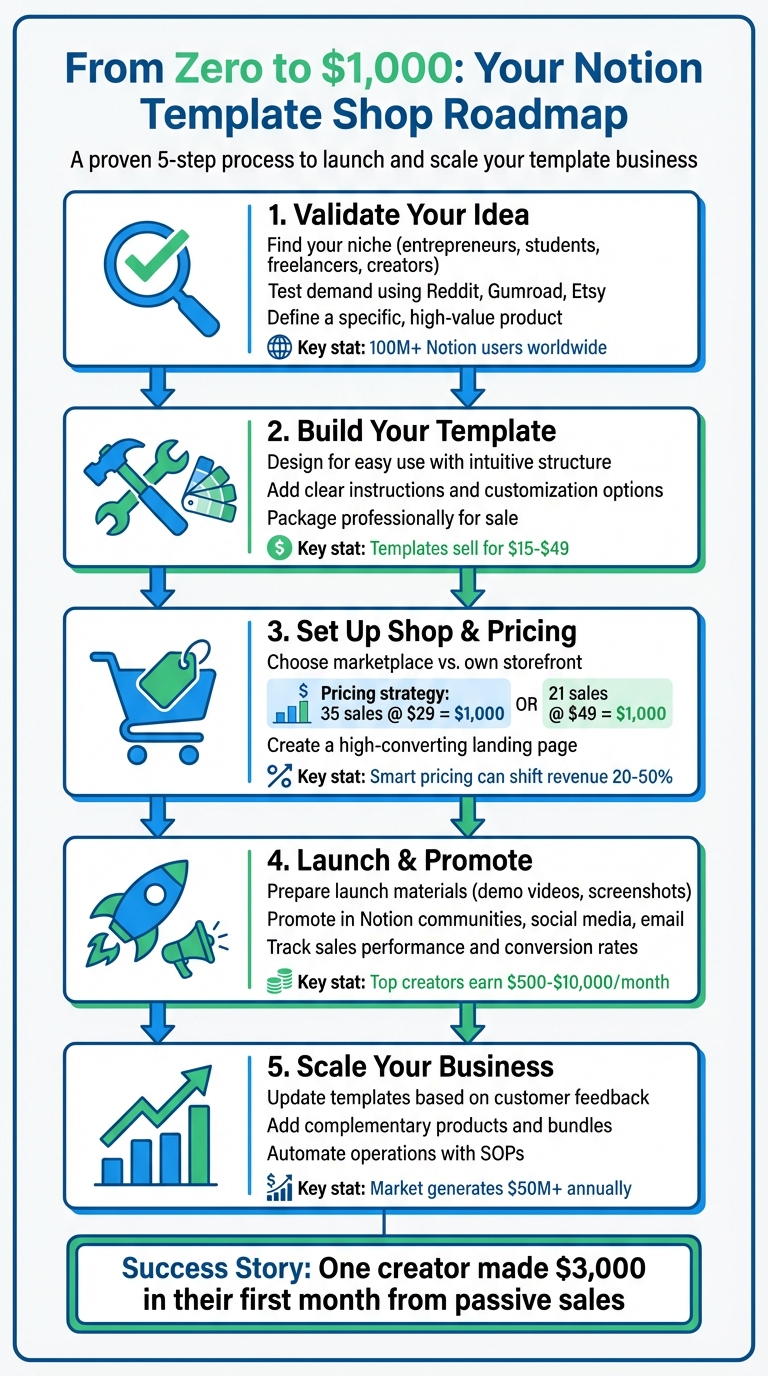
5-Step Process to Make $1,000 Selling Notion Templates
Step 1: Validate Your Template Idea
Find Your Niche and Target Audience
The Notion template market is thriving, generating over $50 million annually and serving more than 100 million users worldwide. To carve out your space, focus on a specific audience and their unique challenges. Platforms like Reddit's r/Notion and r/productivity are goldmines for uncovering common pain points and questions. While general productivity templates are always in demand, niche templates - like those for academic research, wedding planning, or small business management - often face less competition and can fetch higher prices.
Some of the best templates come from systems you've already created to simplify your own life. Maybe you've built a system to manage freelance projects or keep track of your content calendar. Chances are, others could benefit from the same solution. This personal connection not only adds credibility but also helps you resonate with your audience.
Think about targeting groups such as entrepreneurs, college students, freelancers, small business owners, or content creators. For instance, a Content Creator Dashboard could help influencers and YouTubers organize ideas and track their performance metrics. Meanwhile, a Real Estate Portfolio Manager might appeal to property investors keeping tabs on rental income and maintenance schedules.
Once you've identified a promising niche, it's time to validate its demand using the right tools.
Test Demand with Validation Tools
Before diving into template creation, make sure there's a market for your idea. The value of any Notion template lies in its ability to solve a real problem and save users time by offering a proven system.
Tools like IdeaFloat's Problem Validator can help gauge demand and collect early customer feedback. This makes it easier to determine if your template idea addresses a problem people are willing to pay to solve. You can also use Consumer Insights to explore online conversations, understand the language customers use, and verify their needs.
Additionally, investigate what’s already selling on platforms like Gumroad, Etsy, and Twitter. Check forums like Quora and search for terms such as "Notion template recommendations" or "best Notion workflows" to spot recurring themes. Even ChatGPT can be a brainstorming partner - try prompts like, "Give me 10 Notion template ideas for freelancers in 2025."
Once you've verified demand, focus on crafting a specific, high-value product that stands out.
Define Your First Product
With your niche and demand validated, it’s time to design your first product. The key is to create a template that tackles a specific problem for a particular audience. Avoid generic options like basic to-do lists - they’re unlikely to make an impact in a crowded market.
Instead, aim for templates that deliver clear, measurable benefits. For example, a Freelancer Planner can help users manage clients, projects, and finances more effectively. Templates like these save time, enhance organization, and provide a structured approach to achieving goals.
As the Notion template market matures, standing out requires more than a generic offering. The most successful templates solve real problems and serve as a "blueprint for success". Many creators earn between $500 and $10,000 monthly, with top sellers like Easlo surpassing $500,000 in earnings.
Once your niche is defined and demand confirmed, you're ready to create a template that people will gladly pay for. The next step? Designing a product that’s both functional and user-friendly.
Step 2: Build Your Template
Design for Easy Use
Start by defining the purpose and style of your Notion template. A great template isn't just about looking good - it needs to function well and be easy to use. While an attractive design might grab attention, it's the combination of usability and practicality that keeps users engaged.
Use Notion's hierarchical page system to create an intuitive structure. Incorporate databases with multiple views - like tables, Kanban boards, calendars, timelines, or galleries - and dynamic blocks such as videos, images, and callouts to make your template more functional. The goal is to design something flexible that users can adapt to their changing needs.
Before you put your template up for sale, test it thoroughly. Make sure it loads quickly, navigation is smooth, and all databases work as intended. Pay attention to details like layout, color schemes, fonts, and icons to create a polished and cohesive design that enhances the user experience.
Add Instructions and Customization Options
Once your design is in place, focus on making it easy for users to customize. Your template should act as a foundation that they can tweak to suit their specific needs. Personalization not only boosts productivity but also helps users keep their digital workspace organized.
"Add directions to make your template easier to use. At the top of or throughout your template, include a tutorial (like a Loom video) or written instructions for how to use, tweak, or customize the template."
– Notion
Include a brief tutorial, either as a video or written guide, to walk users through the process of making adjustments. Use callout blocks with clear headings to explain how to customize elements like database properties, text formatting, or view configurations. You can also use background colors to separate sections visually and provide step-by-step instructions for moving content blocks or creating columns using the six-dot drag icon.
For more advanced users, consider adding tips on using Notion formulas to automate tasks, such as calculating deadlines or creating budget trackers. Show them how to embed third-party widgets using the /embed block to add dynamic content.
Address common questions proactively. For instance, remind users to duplicate the template into their own workspace for editing and explain how to unlock database views if they're locked.
Package Your Template for Sale
Choose a name that clearly communicates the template's purpose. Examples like "Brand Assets", "Brand Style Guide", or "Social Media Brand Kit" make it immediately clear what users are getting.
"Templates are 'done-for-you' solutions people gladly pay $15–$49 for because they save hours of setup time."
– Reid Madduxx
Tailor your template for a U.S. audience by using details like dollar signs ($) for currency, MM/DD/YYYY for dates, and imperial measurements. These small adjustments make your template feel professional and ready for an American user base.
Create a standout listing by writing a descriptive title, outlining the template's benefits and features, and categorizing it appropriately. Use high-quality visuals - screenshots or videos - to showcase its best elements. Building a strong personal brand also helps; develop a unique profile with a custom cover photo and bio to stand out in the Notion Marketplace.
Lastly, protect your work by enabling access-locking features to prevent unauthorized sharing or redistribution. With everything in place, your template is ready to hit the market and start generating sales.
Step 3: Set Up Your Shop and Pricing
Choose Where to Sell
When it comes to selling your Notion template, you have two main options: online marketplaces or your own storefront. Marketplaces, like the Notion Marketplace, give you instant access to a large audience actively looking for templates. However, they typically take a cut of your sales - usually between 20% and 30%. On the other hand, setting up your own storefront lets you keep more of your earnings and gives you full control over pricing, branding, and customer relationships. The downside? You’ll need to handle your own marketing to drive traffic. Many sellers use both approaches to maximize their reach. Decide which route - or combination - fits your goals and balances control with audience access.
Calculate Your Pricing to Reach $1,000
With your shop ready, it’s time to figure out your pricing strategy. The right pricing can make a big difference - small tweaks can shift your revenue by 20–50%. For Notion templates, value-based pricing tends to work best. Instead of simply matching competitors, price your template based on the value it offers. For example, if your template saves someone five hours of work and their time is worth $50 per hour, pricing it at $29 feels like a great deal. At $29, you’d need about 35 sales to hit $1,000. Pricing it higher, say at $49, would mean fewer sales - just 21 - to reach the same goal. Don’t forget to adjust your targets to account for any transaction fees.
You can fine-tune your pricing with tools like IdeaFloat's Advanced Pricing Research. This tool analyzes market trends and uses pricing strategies to help you find the perfect balance. Also, keep in mind that using U.S. dollars ($) and localizing your pricing can increase revenue per customer by up to 30%.
Create a Landing Page That Sells
Once you’ve set your pricing, it’s time to build a landing page that converts visitors into buyers. Your landing page should make it easy for potential customers to understand the value of your template and take action. Start with a strong headline that highlights how your template solves a specific problem.
Use visuals like screenshots, demo videos, and lifestyle images to help visitors imagine how they’ll use the template. Write benefit-driven copy that focuses on what the customer will gain. For example, instead of saying, "Includes 5 database views", explain how they can "track projects in the format that suits them best - whether it’s a table, calendar, or Kanban board."
Trust is crucial, so include social proof like customer testimonials with real names and detailed feedback. If you’re just starting out and don’t have reviews, offer your template to a small group of beta users in exchange for honest feedback. Research shows that adding case studies can increase a customer’s willingness to pay by 10–15%, while a well-designed page can boost it by 20%.
Make your call-to-action (CTA) impossible to miss. Use action-focused phrases like "Get Instant Access" or "Buy Now for $29", and make the button stand out with bold, contrasting colors. Place the CTA in multiple spots - above the fold and at the bottom of the page - for maximum visibility.
If you’re offering bonuses or limited-time discounts, highlight them to create urgency. Just be cautious with discounts - keeping them under 20% is ideal since larger discounts can lead to higher churn rates.
How I made my First £1,000 Selling Notion Templates (without social media or ads)

sbb-itb-08dd11e
Step 4: Launch and Get Your First $1,000
Now that you’ve validated your idea and built a solid shop, it’s time to focus on launching your product and driving those all-important initial sales.
Prepare Your Launch Materials
Before you go live, make sure your shop is ready to impress. Start with your branding - tools like IdeaFloat's Logo Generator can help you create professional logos and brand guidelines, giving your shop a polished and cohesive look right from the start. Next, create a demo video or take clear screenshots that show buyers exactly how your template functions. Your product listing should be detailed and engaging - write a thorough description that outlines everything included, use emojis to spotlight key features, and add testimonials if you have them. Don’t forget to enable "Share to web" and check the "Allow duplicate as template" option so that buyers can immediately start using your product.
Once your materials are in place, shift your focus to reaching and engaging your audience.
Promote in the Right Places
With your assets ready to go, the next step is to spread the word about your product effectively. Tap into Notion communities like Facebook Groups, subreddits such as r/Notion, and active Discord servers. Don’t just drop links - engage with the community by offering valuable tips or insights, naturally introducing your template as part of the conversation.
On social media, create short and eye-catching videos for platforms like TikTok or Instagram Reels to showcase your template in action. Use relevant hashtags like #NotionTemplates and #Productivity to reach your audience. Twitter is another great platform - share updates about what you’re building and why, giving your followers a behind-the-scenes look. If you have an email list, send out a launch announcement with a special offer or discount to encourage early sales. You could also offer your first template for free or at a significant discount in exchange for honest feedback and testimonials.
Many successful creators have built loyal followings by engaging authentically with social media audiences and Notion communities.
One thing to note: Product Hunt has become less effective for selling Notion templates since early 2024, as the platform no longer features them on its homepage. For example, in July 2024, Happy Habbits Blog launched a Notion Dashboard for Freelance Designers after two weeks of promotion. They reached out to 400 potential customers, earning 29 upvotes and 13 comments - but no sales. If you decide to use Product Hunt, focus on building backlinks and engaging with the community rather than expecting immediate revenue.
Track and Improve Sales Performance
After launching, it’s essential to monitor your sales and figure out what’s working. Tools like IdeaFloat's Financial Model can help you track your revenue, expenses, and which products are performing best. Pay close attention to the promotional channels that drive the most traffic and adjust your efforts accordingly. Keep an eye on your conversion rate, too. For instance, if your conversion rate is only 2%, there’s room to tweak things. Experiment with different elements, like rewriting your headline, adjusting your pricing, or adding more testimonials.
Also, keep a close watch on your expenses - transaction fees, platform costs, and marketing spend can eat into your profits if you’re not careful. If your ad spend exceeds your revenue, it’s time to rethink your strategy. Remember, hitting your first $1,000 is just the beginning of your journey, so use this phase to refine your approach and build momentum.
Step 5: Scale Your Template Shop
Once you've hit your first $1,000 in sales, it's time to fine-tune your operations and prepare for growth. By building on your successful products and initial traction, you can set the stage for long-term success.
Update Templates Based on Feedback
Customer feedback is a goldmine for improving your products. Pay attention to ratings and reviews on the platforms where you sell. For instance, the "Growth Marketing Testing Roadmap Template" on the Notion Marketplace boasts a 4.95 out of 5 rating from 26 reviews, with users highlighting its simplicity and usefulness, saying it helps them "get set up fast". Feedback like this shows you what resonates with your audience and where there's room for improvement. When you make updates, let your existing customers know - this not only builds trust but also shows your commitment to delivering value.
In addition to refining your current offerings, consider expanding your product lineup to reach more customers and increase revenue.
Add More Products
Introducing new templates can quickly grow your revenue. Think about creating all-in-one "Operating System" templates for specific audiences, such as "Small Business OS", "Freelance OS", or "Manager OS." These templates could centralize tasks like project management, client tracking, sales, and finances into a single workspace.
Another strategy is to create complementary templates that encourage bundling. For example, the "E-Commerce Checklist" template, priced at $39, offers a detailed guide with over 200 tools and 12 frameworks for boosting conversions. Similarly, the "Product OS Notion Template" caters to product and tech teams, providing features like OKR management and sprint tracking for teams of 3 to 75 people. Use market research and data analysis to spot gaps in the market and validate demand before committing time to new projects.
As your product offerings grow, streamlining your operations will be key to managing this expansion.
Automate Your Operations
To scale efficiently, create Standard Operating Procedures (SOPs) for tasks like customer support, product delivery, and marketing. Use Notion’s flexible tools to build workflows that integrate documents, tasks, and wikis into one cohesive system.
You might also consider investing in comprehensive template kits, such as the "Notion Ecommerce Business KIT", priced at $55 (or $44 with a promo code). This kit includes over 30 pre-built templates for managing inventory, orders, customer tracking, refunds, and marketing strategies. It features "connected pages", where updates in one section automatically reflect across related areas, saving you time and reducing manual effort.
Finally, keep a close eye on your expenses, like transaction fees, platform costs, and marketing spend. Reinvest your profits thoughtfully to ensure your business continues to grow sustainably.
Conclusion: From Zero to $1,000 and Beyond
Building a Notion template shop isn’t an overnight success story - it’s a journey that thrives on consistent effort and thoughtful planning. Now you’ve got the full game plan: start by researching what your audience actually needs, create templates that are both functional and visually appealing, set up your shop with smart pricing strategies, launch with focused promotion, and grow by listening to feedback and expanding your offerings. These steps not only confirm the market's demand but also provide a solid starting point for long-term success.
With over 50 million Notion users and creators reporting earnings ranging from $500 to $10,000 a month, the potential is undeniable. One Reddit user even shared that they made $3,000 in their first month - mostly from passive sales.
Keep the 5-step process in mind as you move forward. As Notion’s Templates Team advises:
"The best-selling templates are those that are crystal clear in their utility and value".
Focus on solving specific problems with straightforward designs and think beyond just marketplaces to promote your work. Platforms like YouTube, blog posts, and personal networks can help you reach more people and boost your visibility.
To keep growing, make decisions based on real data. Track your sales, gather feedback through email interactions, and use those insights to improve your templates and create new ones that resonate with your audience. Tools like IdeaFloat can also help you validate your ideas, understand your target market, and set pricing that aligns with your revenue goals - so you’re working with a plan, not just guessing.
With this roadmap in hand, it’s time to dive in. Start with one well-researched template that addresses a genuine need, price it thoughtfully, and share it with the right audience. You might just wake up to your first sale - and that first $1,000 could be closer than you think.
FAQs
How do I choose a profitable niche for my Notion template shop?
To discover a lucrative niche, begin by pinpointing the common struggles faced by specific groups, such as students, freelancers, or small business owners. Dive into online communities like Reddit or Quora to see what issues people are discussing and actively seeking solutions for.
Take a close look at successful Notion templates already available. This can help you identify gaps in the market or areas where you can introduce something fresh. Tools like Google Keyword Planner are also handy for researching in-demand topics within the U.S. market. The key is to target niches where there’s a clear need and where your templates can genuinely solve problems.
What are the best ways to market my Notion templates and earn $1,000 in sales?
If you're looking to sell your Notion templates, it's all about building visibility and trust with your audience. Start by creating engaging content, like tutorials or real-life use cases, and share them on social media. This helps potential customers see the value your templates bring to the table. Another smart move? Join online communities or forums related to Notion or productivity. These spaces let you connect with people who are already interested in tools like yours - and give you a chance to share what you’ve created.
Offering free samples or limited-time discounts can also work wonders. These strategies not only attract initial buyers but also help you generate buzz and gain momentum. Don’t forget to optimize your templates for search engines by including relevant keywords in your titles and descriptions. This makes it easier for people to find your products when searching online.
Another way to expand your reach is by collaborating with influencers or bloggers who cater to your target audience. Their endorsement can introduce your templates to a wider group of potential buyers. With consistent effort and smart marketing, you’ll be setting yourself up to achieve that first $1,000 in sales in no time.
How can I price my Notion templates to attract buyers and boost sales?
When deciding how to price your Notion templates, think about their quality, level of complexity, and who your ideal customers are. A good starting point is to look at similar templates in your niche to get a sense of what others are charging. If you're new to selling templates, setting a lower price can help draw in early buyers and establish trust.
As you gather feedback and learn more about what your customers want, you can tweak your pricing to better reflect the uniqueness and appeal of your templates. Another smart strategy is to offer tiered pricing or bundle multiple templates together - this not only boosts sales but also gives your customers more bang for their buck.
Related Blog Posts
 Report an issue
Get the newest tips and tricks of starting your business!