
Start your business marketing for just $50 with a clear, actionable 7-day plan. Here's how to spend your budget:
- $20: IdeaFloat Standard Plan for a go-to-market strategy and customer insights.
- $10: Social media ads to reach your audience quickly.
- $10: Email marketing trial to build and nurture leads.
- $10: Domain or hosting for a professional online presence.
This guide provides ready-made scripts, templates, and a daily schedule to help you execute efficiently. By focusing on four key areas, you'll avoid wasting money and stay on track to land your first paying customers. All you need is one week to test your idea and see results.
Key takeaway: Execution matters more than perfection. Spend wisely, track results, and refine your approach for better outcomes.
How I Got 20,000 Users In Three Months With $50
sbb-itb-08dd11e
How to Spend Your $50
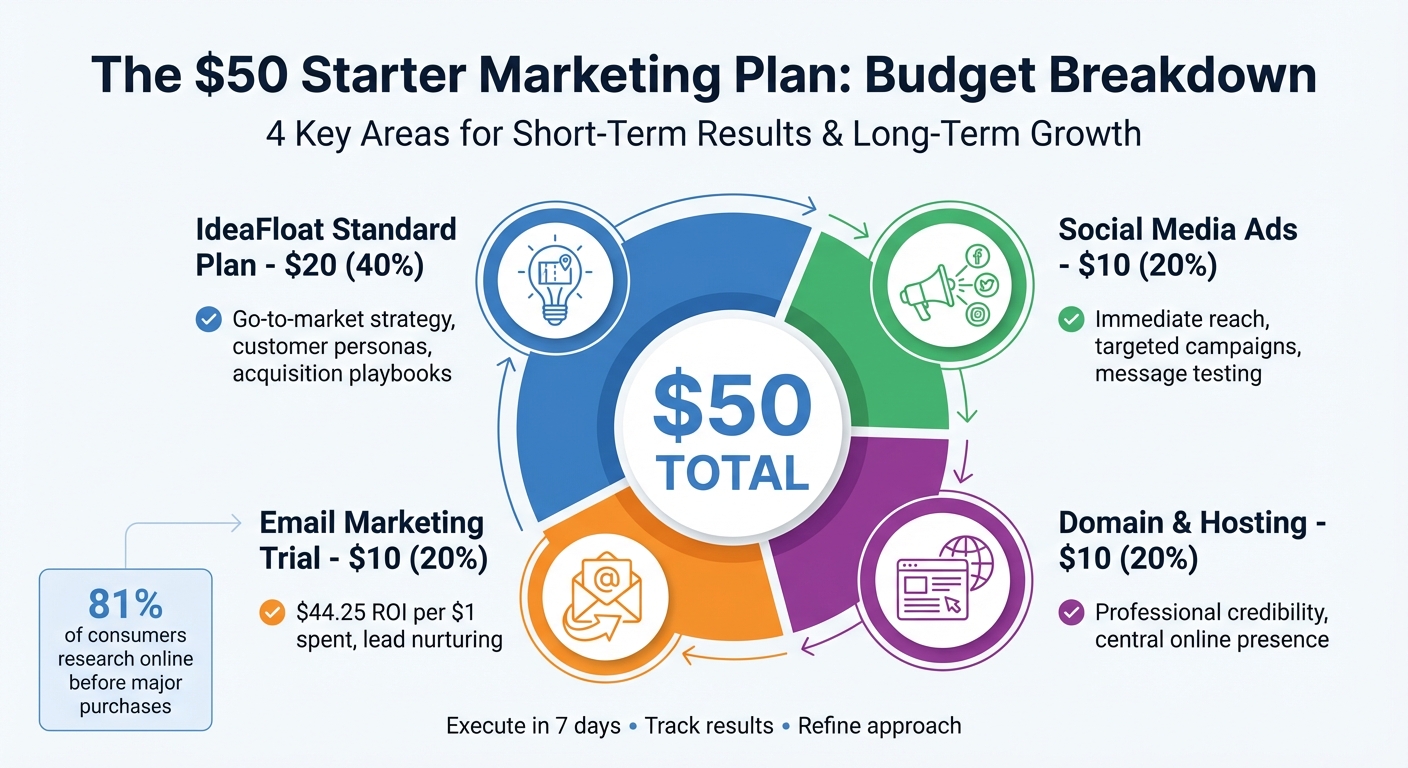
$50 Marketing Budget Breakdown for Startups
Here's a breakdown of how to allocate your $50 marketing budget effectively. Each dollar plays a role in building a system that delivers both short-term results and long-term growth.
The plan divides your budget into four key areas: $20 for strategy and planning, $10 for immediate audience reach, $10 for long-term relationship building, and $10 for establishing an online presence. Together, these categories create a cohesive approach that avoids the chaos of disjointed marketing efforts, ensuring every dollar works toward measurable outcomes.
This allocation is designed to integrate seamlessly, supporting both immediate visibility and sustainable growth. Here's how the budget breaks down:
| Expense Category | Budget | Strategic Contribution |
|---|---|---|
| IdeaFloat Standard Plan | $20 | Provides go-to-market (GTM) strategy, customer personas, and acquisition playbooks to target the right audience |
| Social Media Ads | $10 | Delivers immediate reach to targeted prospects and tests messaging with high-intent traffic |
| Email Marketing Trial | $10 | Builds a direct communication channel with a high ROI and nurtures leads effectively |
| Domain & Hosting | $10 | Establishes professional credibility and a central online presence for customer interactions |
IdeaFloat Standard Plan ($20)
This is the backbone of your marketing efforts. The IdeaFloat Standard Plan provides essential tools like customer acquisition playbooks, competitor insights, and outreach scripts. These resources eliminate guesswork, helping you identify where your audience spends time and what messaging resonates most.
Without this framework, it's easy to waste money on channels or messages that miss the mark. The plan also includes tools to calculate realistic customer acquisition costs and coordinate your launch effectively. By investing $20 here, you ensure that your social media ads, email campaigns, and website messaging align for maximum impact.
Social Media Ads ($10)
Spending $10 on social media ads delivers quick results by putting your message in front of the right people. Platforms like Facebook and Instagram allow you to run highly targeted campaigns for as little as $1 per day. This approach focuses on driving immediate traffic and testing your messaging with real prospects.
Boost posts that already perform well organically. For example, if a product teaser or announcement generates strong engagement, a small ad spend can amplify its reach. Using insights from the IdeaFloat GTM Strategy ensures your ads are laser-focused on the right audience segments, making every dollar count.
Retargeting ads are another smart move. These ads target users who have already visited your site, increasing the likelihood of conversion by 70%. This $10 investment doubles as a testing ground for refining your broader marketing strategy.
Email Marketing Trial ($10)
Email marketing remains one of the most effective tools for startups, offering an average ROI of $44.25 for every $1 spent. Your $10 investment here can cover a trial of email platforms like Mailchimp or ConvertKit, enabling you to build a high-value mailing list.
Set up automated email sequences to nurture leads and guide them through the buyer's journey. Regular emails keep your brand top-of-mind and help close sales faster. Many platforms offer free or low-cost trials for lists of up to 1,000 contacts, making this a cost-effective way to validate your idea and generate initial revenue.
Domain or Hosting ($10)
Your website serves as the central hub for all your marketing efforts. For many customers, it's the first place they’ll go to learn about your business - and for online-only brands, it might be the only place they turn for reliable information. Investing $10 in a domain name or basic hosting establishes your online presence and builds trust, especially when 81% of consumers research online before making major purchases.
Even a simple one-page site can work wonders. Tools like Carrd or Google Sites let you create professional pages that showcase your value proposition and capture email signups. Make sure your site is mobile-friendly - 55% of mobile searches lead to conversions within an hour.
To protect your primary domain, consider registering a secondary one for cold outreach. For example, using a .co or .net variant can help avoid spam flags when sending prospecting emails. This small step enhances your email deliverability and strengthens your digital presence overall.
These four investments create a solid foundation for your marketing strategy, setting you up for success in both the short and long term.
Your 1-Week Schedule
Here’s a 7-day plan designed to turn your initial investment into measurable sales. These daily steps align with your $50 strategy, offering clear and actionable guidance.
Day 1: Set Up IdeaFloat GTM Strategy
Start by signing up for the IdeaFloat Standard Plan and entering your business idea. The platform will generate a tailored go-to-market strategy, helping you identify your ideal customers and the platforms they use. Decide whether a product-led or sales-led approach fits your goals, as this will shape your messaging and outreach efforts.
Day 2: Prepare Community Posts
Leverage IdeaFloat's Community Launch Map to find where your target audience interacts online - whether that’s Reddit, LinkedIn, or niche forums. Use the pre-written posts provided by IdeaFloat, personalizing them to match your voice. Make it a point to reply to every comment and ask questions to encourage conversations. Keep promotional content below 10% of your activity to ensure you're delivering real value.
Once your community engagement is underway, shift focus to building your lead capture system.
Day 3: Create Your Waitlist Page
Use IdeaFloat's Waitlist Landing Page tool to build a page that captures emails and highlights your value proposition. The page should address customer pain points and clearly explain why your product or service is worth their interest. This waitlist becomes a long-term asset for collecting leads, regardless of changes in social media algorithms.
Day 4: Send Outreach Messages
Tap into IdeaFloat's outreach scripts to send personalized emails and direct messages. Follow this structure: Compliment → Case Study → Call to Action. If needed, hire a freelancer on Fiverr or Upwork (for under $50) to compile a list of 100 qualified leads. Send 100 cold emails, aiming to generate 10 sales calls and at least one sale. Don’t forget to include a "P.S." for opt-outs and warm up your email account over a month using automation to avoid spam filters.
Day 5: Boost Your Best Posts
Allocate a $10 social media ad budget to amplify posts that are performing well organically. Use IdeaFloat’s audience segmentation tools to target effectively and retarget site visitors. Monitor the data closely, and shift your budget away from underperforming segments to those showing stronger engagement.
Day 6: Track and Adjust
Analyze your campaign performance using free tools like Google Analytics. Focus on metrics such as Cost Per Lead (CPL), Click-Through Rate (CTR), and Conversion Rate. Experiment with A/B testing for landing pages and email subject lines to find what resonates most with your audience. If certain platforms or audience segments, like LinkedIn or Facebook, show better results, reallocate your budget accordingly.
Day 7: Review and Plan Ahead
Assess the overall results of your campaign to identify which channels delivered the best outcomes. Export a Lean Canvas from IdeaFloat to summarize your business strategy on a single page - perfect for sharing with mentors or potential investors.
"Things will never go exactly as expected even with the best GTM plan, and you need to retain flexibility so you can continue to grow and improve." - Elaine Chen, Founder, Excogita
Based on your findings, refine your approach for the next phase of customer acquisition. For instance, if organic social posts drove more conversions than paid ads, focus more on community engagement. On the other hand, if email outreach proved most effective, expand your lead list and fine-tune your messaging. This review process ensures that your next $50 investment delivers even better results than the first.
5 Marketing Scripts You Can Use Today
Here are five ready-to-use scripts from our Go-to-Market tool, designed to help you tailor your marketing messages quickly and effectively. Each script includes placeholders, so you can easily customize them for your specific needs.
Community Introduction Post
When introducing yourself to a community, be clear about who you help, the problem you address, and how you provide solutions. Use language that resonates with your audience by reflecting their own pain points.
Script:
"Hey everyone! I'm [Your Name], and I help [audience] who struggle with [specific problem]. We built [product/service] to [solution] so you can [outcome]. I'm here to share what I've learned and answer any questions. What's been your biggest challenge with [topic]?"
The key is to engage authentically - focus on answering questions and sparking discussions, not selling. For better results, explore niche subreddits or professional LinkedIn groups.
"Make sure you're going in to help and not to sell. Answer questions, start discussions, and hold AMAs." – Rob Glover, Senior Copywriter, LocaliQ
Next, let’s look at how to personalize direct outreach.
Direct Message Outreach
Personalization is the cornerstone of effective outreach. Reference something specific about the recipient and follow a simple structure: compliment, share a brief success story, and end with a clear call to action.
Script:
"Hi [Name], I noticed [specific observation about their business/post]. We recently helped [similar company] achieve [specific outcome] in [timeframe]. Would you be open to a quick 5-minute call this week to see if we could do something similar for you? P.S. If this isn't relevant, just let me know and I won't follow up."
Now, let’s move to nurturing leads via email.
Email Nurture Sequence
Use a three-email sequence over the course of a week to nurture leads effectively.
Email 1 (Day 1):
"Hi [Name], thanks for downloading [resource]. What's your biggest challenge with [topic]?"
Email 2 (Day 3):
"Hi [Name], I wanted to share how [similar customer] solved [problem] using [your solution]. They saw [specific result] in [timeframe]. Does this sound like something you're experiencing?"
Email 3 (Day 7):
"Hi [Name], I know you're busy, so I'll keep this short. We have [limited spots/special offer] available this week for [service]. Would you be interested in a quick call to see if it's a fit?"
This sequence helps keep your solution top of mind while offering value at every step.
Waitlist Signup Pitch
When pitching a waitlist, focus on solving a clear problem. People sign up because they see immediate value, not because of vague promises.
Script:
"We're building [product] for [audience] who are tired of [problem]. Get early access along with [specific incentive: 25% off, a 30-day extended trial, or VIP feature access]. Join [number] others on the waitlist: [link]."
Lastly, let’s discuss how to close leads who are on the fence.
Follow-Up Close
For leads showing interest but hesitating to commit, address objections directly. Include risk-reversal elements like guarantees, trials, or flexible payment plans to ease concerns.
Script:
"Hi [Name], I wanted to follow up on our conversation about [topic]. I know [common objection: price/timing/uncertainty] can be a concern, which is why we offer [guarantee/trial period/payment plan]. We have availability this week - would [specific day/time] work for a quick call to finalize details?"
Timely follow-ups can make all the difference in converting interested leads into loyal customers.
3 Campaign Templates
These templates are designed to help you execute your campaigns consistently while making the most of your $50 budget. They streamline your efforts across social media, email, and performance tracking, ensuring every dollar is accounted for.
Social Media Calendar
A social media calendar helps you maintain a steady posting schedule by organizing platforms, content types, and timing in advance. If you're working with a $50 budget, Google Sheets is a practical and shareable tool to start with. Use color coding to quickly identify post types: blue for educational content, green for promotions, and red for engagement posts. This visual approach makes it easier to spot gaps in your posting schedule.
Take Shopify merchant Great Jones as an example. They integrated their content calendar across SMS and email platforms, which led to a 97% boost in SMS click-through rates and a 70% increase in SMS revenue.
Once your social media is organized, the next step is to map out your email strategy.
Email Sequence Planner
An email sequence planner is your blueprint for guiding customers from their first interaction to making a purchase. Use it to lay out newsletters, product announcements, and special offers. For each email, define its purpose, subject line, call-to-action (CTA), and timing.
For inspiration, look at what the University of Illinois Urbana-Champaign achieved during the 2021–2022 admissions cycle. Under Andy Borst's leadership, the admissions team created segmented email flows tailored to different stages of the student journey. This approach led to over 63,000 applications - an impressive 33% increase from the previous year - and reduced the acceptance rate from 60% to 45%.
Campaign Tracking Sheet
A campaign tracking sheet keeps all your key metrics - like leads, customer acquisition cost (CAC), return on investment (ROI), and budget use - in one place. This tool shows how effectively your $50 is being spent. If a channel exceeds your CAC target for two weeks in a row, pause it and reallocate those funds to better-performing channels.
"Plan the work; work the plan." – Vital Design
| Template Name | Key Components | Expected Output |
|---|---|---|
| Social Media Calendar | Channel, Post Type, Visuals, Schedule | Consistent Engagement |
| Email Sequence Planner | Segments, Subject Lines, CTAs, Timing | Lead Nurturing & Conversion |
| Campaign Tracking Sheet | KPIs (CAC, ROI), Budget, Metrics | Performance Optimization |
To stay on top of your campaigns, review your social media calendar daily, update your email planner weekly, and check your tracking sheet at least once a week. This routine helps you catch and address any performance issues early.
Tools and Tracking Tips
Keep tabs on your $50 marketing plan with some excellent free tools. Google Analytics is a go-to for understanding how visitors interact with your site. Pair it with Google Search Console to dive into your search performance. For social media, Buffer offers a free plan where you can schedule up to 10 posts across three platforms and track basic engagement metrics.
Free Analytics Tools
Google Analytics is perfect for tracking where your traffic comes from, how long visitors stay, and which pages drive conversions. To dig deeper, use Google's URL Builder to create custom UTM parameters for your links - this way, you can pinpoint exactly where your traffic originates. To visualize visitor behavior, Hotjar offers a free plan that includes heatmaps and session recordings.
For tracking beyond your website, free email marketing tools are a great way to measure the success of your outreach campaigns.
Email Marketing Platforms
If you’re just starting, Mailchimp provides a free plan for up to 250 contacts. For newsletters, beehiiv allows up to 2,500 subscribers for free, while Kit (formerly ConvertKit) supports up to 10,000 subscribers, all with basic analytics to monitor open rates and clicks. Email marketing can be incredibly effective, with an average ROI of 3,800%.
Now, let’s talk about measuring your campaign’s financial success.
How to Calculate ROI
To calculate ROI, use this formula: ROI = (Sales Revenue – Marketing Cost) ÷ Marketing Cost. For instance, if your $50 investment generates $240 in sales, your ROI would be ($240 – $50) ÷ $50 = 380%. Keep track of key metrics like total spend, impressions, clicks, and revenue growth on a weekly basis to evaluate how well your strategy performs.
Before diving in, set SMART goals (Specific, Measurable, Achievable, Relevant, Time-bound). For example, aim to "increase email signups by 15% in 7 days" to give yourself a clear and measurable target.
"You can calculate your ROI by subtracting your expenses from the revenue of a particular campaign to determine whether your marketing strategies are helping you succeed." – Mailchimp
What You Need to Remember
With just $50 divided across four key areas, you can launch a complete marketing campaign in seven days. Here's the breakdown: IdeaFloat's Standard Plan ($20), social media ads ($10), email marketing ($10), and a domain ($10). The key is to focus on two or three channels where your target audience is most active.
This budget isn't random - it's carefully allocated to cover strategy, outreach, and building credibility. IdeaFloat's GTM Strategy simplifies the process by identifying your audience and providing ready-to-use outreach scripts, so you're not stuck juggling endless options.
The 1-week timeline keeps you on track, turning big marketing ideas into manageable daily tasks. As Wilco Web Services wisely says:
"A plan you can ship beats a plan you admire"
To measure success, track your numbers weekly using this ROI formula: (Sales Revenue – $50) ÷ $50. On average, small businesses with fewer than 50 employees spend 15.1% of their budget on marketing to generate 17% of their revenue.
One last thing: your marketing plan isn't set in stone. At the end of Week 1, review your results. Double down on what works and drop what doesn’t. The goal? Land your first paying customers without overthinking or overspending.
FAQs
How can I get the most out of a $50 marketing budget?
With just $50 to spend on marketing, it’s all about finding strategies that pack a punch without emptying your wallet. One of the best places to start? Social media. Platforms like Instagram, Facebook, and TikTok let you connect with your audience for free or at a minimal cost. By creating engaging content - think short videos, catchy posts, or interactive stories - you can grab attention without breaking the bank. Don’t forget to use local hashtags and actively engage with your community to boost your organic reach.
Another great tactic is tapping into local resources. Community boards, online groups, or even partnerships with nearby businesses can help you increase your visibility at little to no cost. These grassroots efforts can be surprisingly effective. Plus, tools like pre-designed templates or scripts can save you time and ensure your messaging stays polished and professional.
To get the most out of your budget, consider mapping out a one-week plan that focuses on activities with the highest return. For example, personalized outreach or referral programs can deliver big results with minimal spending. By prioritizing effort over expense, you can stretch your $50 and still see meaningful outcomes.
What are the main advantages of the IdeaFloat Standard Plan?
The IdeaFloat Standard Plan provides a straightforward framework to organize your marketing efforts, bring your team together, and set clear, measurable objectives. It’s designed to make creating a marketing strategy easier while keeping costs in check.
With this plan, you can simplify your processes, prioritize activities that deliver the most value, and work toward steady growth. Plus, it includes practical tools and step-by-step instructions, making it especially suited for businesses working with smaller budgets.
How can I effectively prioritize tasks in the $50 Starter Marketing Plan's 1-week schedule?
To get the most out of your 1-week marketing plan, start by tackling the core tasks. Begin with a clear understanding of your target audience and buyer personas - this ensures your message connects with the right people. Next, map out your main campaigns, set specific goals, and create a realistic timeline for the week.
In the first couple of days, focus on research, defining your objectives, and gathering resources like templates or scripts. Midweek, shift gears to producing and scheduling content, such as social media posts or email campaigns. As the week wraps up, review your progress, tweak your strategies as needed, and lay the groundwork for activities that will continue beyond this initial week.
This step-by-step approach helps you create a solid starting point, making it easier to execute your marketing plan effectively while sticking to your $50 budget.
Related Blog Posts
 Report an issue
Get the newest tips and tricks of starting your business!