Managing cash flow is one of the biggest challenges startups face, with 82% of small businesses failing due to cash flow problems. This free cash-flow forecast template helps you track income, expenses, and cash balances over 12 months. Designed for startups, it simplifies financial planning with:
- Automatic calculations for net cash flow, burn rate, and runway.
- Pre-built tabs to organize income, expenses, and summaries.
- Scenario planning to prepare for delays, startup costs, or revenue changes.
- Visual charts to spot trends and plan ahead.
Download the template, input your starting cash balance, and update it monthly to stay ahead of potential cash shortfalls. This tool helps you make smarter decisions about spending, hiring, and growth. Start using it today to take control of your startup's financial health.
How to Download and Set Up the Free Template
Accessing the Template
The IdeaFloat cash-flow forecast template works seamlessly with Microsoft Excel and Google Sheets, giving you flexibility based on your preferred platform. For collaboration with co-founders or advisors, open the template in Google Sheets by clicking the provided link. Then, select "Make a Copy" to save it directly to your Google Drive. Prefer working offline? Download the Excel (.xlsx) version instead. Both options give you complete access to all features without needing to sign up for a subscription or provide credit card details.
Setting Up US Formatting
Once you've accessed the template, make sure it’s formatted for US standards. The template is already set up with US financial formatting, so you won’t need to adjust things like currency symbols or date formats manually. Dollar amounts are displayed as $10,500.50 (using commas for thousands and periods for decimals), and dates follow the MM/DD/YYYY format - for example, 02/14/2026 for February 14, 2026. If you're using Google Sheets and notice any formatting issues, go to File > Settings > Locale and set it to "United States." This step ensures your numbers, dates, and currency are displayed in line with standard US accounting practices.
Entering Your Starting Cash Balance
To set your financial baseline, start by entering your Opening Cash Balance for Month 1. This figure should represent the total cash you currently have, including your bank account balance and any physical cash. For example, if your total available cash is $50,000.00, enter that amount. After this initial entry, the template will automatically calculate each month's opening balance based on the prior month's closing balance. You’ll only need to input this starting figure once. Be careful not to edit cells with automated formulas - these are often highlighted in blue or another distinctive color - to avoid disrupting the calculations.
sbb-itb-08dd11e
What's Included in the Template
Pre-Built Tabs for Income, Expenses, and Summaries
This template comes with three essential tabs: Income, Expenses, and Summary. These tabs work together to give you a complete picture of your cash flow. The Income/Sources of Cash tab tracks all incoming money, whether it’s from sales, loans, or other sources. The Expenses/Uses of Cash tab organizes your outflows, including payroll, rent, utilities, marketing, professional fees, insurance, loan repayments, and inventory costs. Finally, the Summary/Balance tab pulls everything together, displaying your opening cash balance, total inflows and outflows for the month, and the resulting net cash change for each period. With pre-built formulas, this setup ensures every dollar is accounted for, making financial planning for your startup much easier.
Automatic Calculations and Charts
The template simplifies your work with built-in formulas that handle all the math for you. It calculates your Net Cash Flow by subtracting total expenses from total income. That figure is then added to your opening balance to determine the Closing Balance for the month. This closing balance automatically rolls over as the next month’s opening balance, creating a seamless 12-month forecast.
To make data easier to interpret, the template includes visual charts that turn numbers into trend lines and bar graphs. These visuals highlight your cash runway - essentially, how long your business can keep running without needing extra funds. They also help identify seasonal trends or irregular payment cycles, which is critical since 91% of small businesses report facing serious cash flow issues. These automatic calculations and visuals make it easier to prepare for dynamic financial scenarios.
Scenario Planning Tabs
The Scenario Planning Tabs allow you to simulate different market conditions, whether they’re best-case, worst-case, or somewhere in between. By comparing these scenarios side-by-side, you can make informed decisions about funding needs or cost-saving strategies. This feature is particularly helpful for tracking your burn rate - the speed at which you’re using your cash reserves - and determining when you might need to secure additional capital or adjust spending.
How to Create a Cash Flow Forecast (in under 20 minutes) {FREE TEMPLATE}
How to Use the Template: Step-by-Step
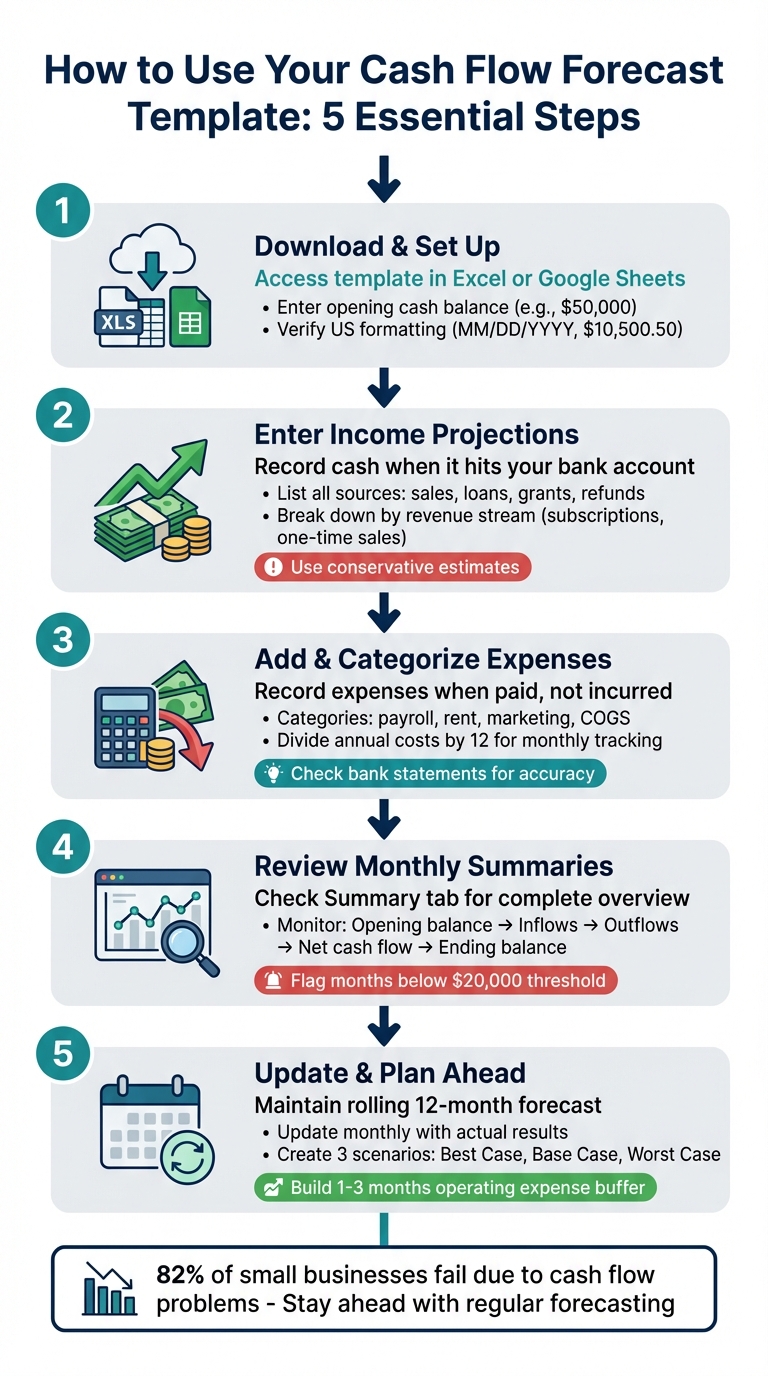
How to Set Up and Use a Cash Flow Forecast Template in 5 Steps
Entering Income and Revenue Projections
Start by opening the Income/Sources of Cash tab and listing all cash inflows, such as sales, loans, grants, tax refunds, interest, and asset sales. The critical point here is to record income based on when the cash actually reaches your bank account, not when you issue an invoice. This ensures your projections align with your actual cash flow. Make sure to log income in the specific month it is received.
Break down each income stream - like subscriptions, one-time sales, loans, or grants - into separate rows. This approach makes it easier to pinpoint which sources significantly impact your balance. Use recent bank statements to base your projections on real data. When estimating income, lean toward conservative figures. It's always better to underestimate slightly than to overestimate and face surprises later. For businesses with irregular payment cycles, such as agencies or construction firms, make sure to account for delays in accounts receivable to reflect your actual cash flow timing.
Adding and Categorizing Expenses
Once you've mapped out income, shift your focus to expenses to complete your cash flow overview. Go to the Expenses/Uses of Cash tab and group your spending into categories. These might include operating expenses, payroll, marketing, cost of goods sold (COGS), financial obligations, and capital expenditures. Record expenses in the month they are paid, not when they are incurred.
Double-check recent bank statements to ensure recurring expenses are accurately captured. For costs that occur annually, divide the total by 12 to spread them evenly across the months. Keep your categories straightforward and focus on the most significant outflows to maintain clarity. Avoid overcomplicating things with minor expenses that won’t meaningfully impact your overall cash flow.
Reviewing Monthly and Annual Summaries
After logging income and expenses, move to the Summary/Balance tab to review your cash flow at a glance. This tab provides a breakdown of your monthly opening balance, inflows, outflows, net cash flow, and ending balance. The ending balance for each month automatically carries over as the opening balance for the following month, creating a continuous 12-month forecast.
Pay close attention to net cash flow trends and ending balances to assess your liquidity. If your balance dips below a safe threshold - say, $20,000 - take immediate action to reduce spending or find additional funding. Regularly compare your projections with actual results to fine-tune your assumptions and improve accuracy over time.
To stay ahead of potential cash flow challenges, add each new month to your forecast, keeping it as a rolling 12-month plan. This habit ensures you remain proactive in managing your finances.
Customizing the Template for Your Business
Adjusting for Different Business Models
Tailoring the template for your business ensures more precise forecasting. For instance, SaaS companies should include rows for recurring subscription revenue, renewal rates, churn rate, and customer acquisition cost (CAC) to reflect their unique revenue cycle and expenses. E-commerce and retail businesses, on the other hand, need to account for inventory purchases, seasonal sales fluctuations, and shipping costs. Adding rows for stock turnover and material costs helps track how inventory affects cash flow. If you run a service-based business like a consulting firm, emphasize milestone payments, retainers, and project-based fees for a clearer financial picture. Meanwhile, construction businesses should incorporate progress billing, retention holdbacks, and upfront labor costs to account for stage-based payments.
To keep everything organized, structure your custom rows into three key sections: Operating (e.g., customer payments, payroll), Investing (e.g., equipment, software licenses), and Financing (e.g., loans, equity inflows). This layout provides a clear view of cash movements and simplifies forecasting.
Once the basic structure is set, you can improve accuracy by adding metrics tailored to your operations.
Adding Custom Metrics and Measurements
Standard income and expense categories are a good start, but tracking specific metrics gives you a deeper understanding of cash flow. Create an "Inputs" tab to define assumptions like average days to collect receivables, monthly growth rates, or advertising costs per click (CPC). Link these assumptions to your forecast so updates automatically adjust your model.
For example, if workforce costs are a major factor, include rows for monthly base salaries, benefits as a percentage of pay, and software costs per employee. If you're in e-commerce, you might track CPC and advertising spend by channel to monitor marketing efficiency. When adding custom rows, double-check your "Total" formulas to ensure they include the new data - otherwise, your cash flow calculations could be inaccurate.
"A forecasting template (also known as a cash forecasting model) is a blueprint that finance teams use for cash flow projection. Typically, the document sets out the key dimensions of a forecast model: the time horizon, time-period granularity, and cash flow categories." - GTreasury
By incorporating these custom metrics, you can gain sharper insights into your cash flow and make informed decisions to support your business's growth.
Expanding the Template for Multiple Projects
If you’re juggling multiple ventures or revenue streams, scaling the template can help you stay organized. Use a "Transactions" tab to label each entry by project or category. This allows you to filter and analyze results for individual ventures while maintaining a single, unified template.
For businesses with diverse product lines - like a SaaS company offering multiple subscription tiers - add separate rows for each revenue stream in your Income tab. If you’re managing entirely different entities or clients, you can clone the template and consolidate the results into a master summary.
When linking multiple projects, ensure the opening balance of each new period ties back to the previous period’s closing balance. This keeps your rolling forecast accurate as you track performance across various initiatives and expand into new areas.
Reading Your Results and Planning Next Steps
Once you've tailored your template, the next step is to interpret your cash flow data and decide on your upcoming strategies.
Spotting Cash Flow Trends and Shortfalls
With your forecast complete, it’s time to dig into the numbers. Start by reviewing your monthly ending cash balances and flag any months where the balance dips below your set safety threshold. For instance, if you’ve determined $20,000 as your minimum acceptable balance, pay close attention to months where your forecast drops under that amount. These are the moments when you might need to speed up collections, postpone expenses, or arrange short-term financing.
Timing is just as important as totals. Even a profitable business can face cash flow problems if payments from customers take 60 days, while fixed costs like rent are due at the start of the month. Look for patterns in delayed payments - certain clients or industries may consistently pay late. If you notice a shortfall mid-month but expect a large inflow later, you can plan ahead by leveraging credit lines or renegotiating supplier terms.
"A good template does not predict the future with perfection. It shows how close or far your current operations are from a cash shortage, so you have time to respond, not react." - Ariel Gottfeld, CashFlow Frog
To prepare for different scenarios, create three versions of your forecast: Best Case (strong demand), Base Case (realistic projections), and Worst Case (a 20% revenue decline or delayed payments). This will help you identify whether a cash shortfall is a temporary hiccup or a sign of deeper issues requiring cost cuts, faster collections, or additional funding.
Using Results with Other IdeaFloat Tools

After identifying trends and potential shortfalls, connect your cash-flow insights with other IdeaFloat tools to get a comprehensive financial overview. Cross-check your revenue assumptions with the Financial Projections & Breakeven Analysis. For example, if your breakeven analysis predicts profitability by Month 6 but your cash-flow forecast highlights a shortfall in Month 4, you might need bridge financing or faster payment terms.
Use the Cost Analysis tool to ensure all your expenses - like website hosting fees or quarterly taxes - are accurately captured in your forecast. Additionally, your Go-to-Market Strategy can refine your revenue assumptions by factoring in customer acquisition data.
If your forecast shows consistent surpluses, consider using the Product & Service Creator to model how launching a new offering would impact your cash flow. Calculate how many additional units you’d need to sell to cover costs and ensure your reserves can support the launch. This integrated approach keeps your financial planning grounded in real data rather than overly optimistic guesses.
By combining these tools, you’re better equipped to move beyond short-term fixes and start planning for sustainable growth.
Planning for Long-Term Stability and Growth
While short-term forecasts help you navigate immediate challenges, long-term projections allow you to shape the future of your business. Use a 12-month forecast to anticipate when issues like staffing constraints may arise. Before hiring, ensure you can cover new payroll costs for at least six months. Similarly, plan major purchases - like equipment or technology - during periods of projected cash surpluses to avoid straining your daily operations.
Set aside one to three months of operating expenses as a buffer for lean times or unexpected market shifts. Use periods of strong cash flow to build these reserves or fund strategic investments rather than increasing discretionary spending. To stay ahead, maintain a rolling forecast by updating your model every month and adding a new month to keep a consistent 12-month view. This approach ensures your plans remain current and helps you spot potential issues early.
"Short-term forecasts help with survival... Long-term forecasts help with planning. They tell you if your business can fund the future you want." - Ariel Gottfeld, CashFlow Frog
Clear and accurate forecasts also strengthen your case with lenders and investors. By presenting realistic projections supported by scenario planning, you demonstrate that you understand your business and can manage risks effectively. This can improve your chances of securing funding on favorable terms, empowering you to scale your business with confidence.
Conclusion
Managing cash flow effectively is what keeps your startup running. This free template offers the clarity you need to steer clear of financial shortfalls and make smarter decisions.
With features like automated calculations, built-in charts, and scenario planning, you can shift your focus from tedious spreadsheet tasks to driving strategic growth. Whether you're monitoring your burn rate, planning for new hires, or gearing up for investor meetings, having precise cash flow projections boosts your credibility with stakeholders.
"Cash flows are the net amount of cash and cash-equivalents being transferred into and out of a business. Cash received are inflows, and money spent are outflows." - Adam Hayes, Writer
Getting started is simple. Download the template and input your current bank balance. Add your projected income and expenses for the next 12 months, using conservative estimates. Update the numbers weekly with actual data and review them monthly to refine your projections. This habit provides the insight you need to handle lean months, seize expansion opportunities, and keep your finances steady.
Download the free cash-flow forecast template now and take charge of your startup's financial health. Stay ahead by tracking your cash flow today!
FAQs
How do I estimate cash timing if customers pay late?
To better predict cash flow when customers pay late, adjust your projections to reflect realistic collection timelines. Take into account typical payment delays and incorporate these patterns into your forecast. This approach helps you prepare for potential cash shortfalls and ensures your financial planning aligns with the actual timing of cash receipts.
What counts as “starting cash” in Month 1?
"Starting cash" in Month 1 represents the total amount of money you have at the very beginning of the period. This includes the cash balance you already have on hand, before factoring in any income or expenses.
How can I set a safe minimum cash balance?
To figure out a safe minimum cash balance for your business, start by identifying a buffer that can handle both essential expenses and unexpected costs. This cushion is crucial for staying financially stable during periods of cash flow ups and downs. Take a close look at your average monthly expenses, then add an extra margin to account for emergencies. This combination can help you determine the right amount to keep on hand.
Related Blog Posts
 Report an issue
Get the newest tips and tricks of starting your business!