
Choosing between Bizplan and LivePlan depends on your business needs. Here's a quick summary:
- Bizplan is ideal for startups focused on securing funding. It integrates with Fundable for crowdfunding, offers unlimited collaborators, and includes educational resources. Pricing starts at $29/month, with a $349 lifetime access option.
- LivePlan is better for managing and growing established businesses. It excels in financial forecasting, performance tracking, and integrates with QuickBooks and Xero. Plans start at $15/month (annual billing) with a 35-day money-back guarantee.
Quick Comparison
| Feature | Bizplan | LivePlan |
|---|---|---|
| Focus | Fundraising & startups | Financial tracking & growth |
| Team Access | Unlimited | Up to 5 contributors |
| Accounting Sync | No | Yes (QuickBooks, Xero) |
| Pricing | $29/month or $349 lifetime | $15–$40/month (annual) |
| Refund Policy | 7 days | 35 days |
If you're pitching to investors with a perfect pitch deck, go with Bizplan. If you're managing finances and tracking performance, LivePlan is your best bet.
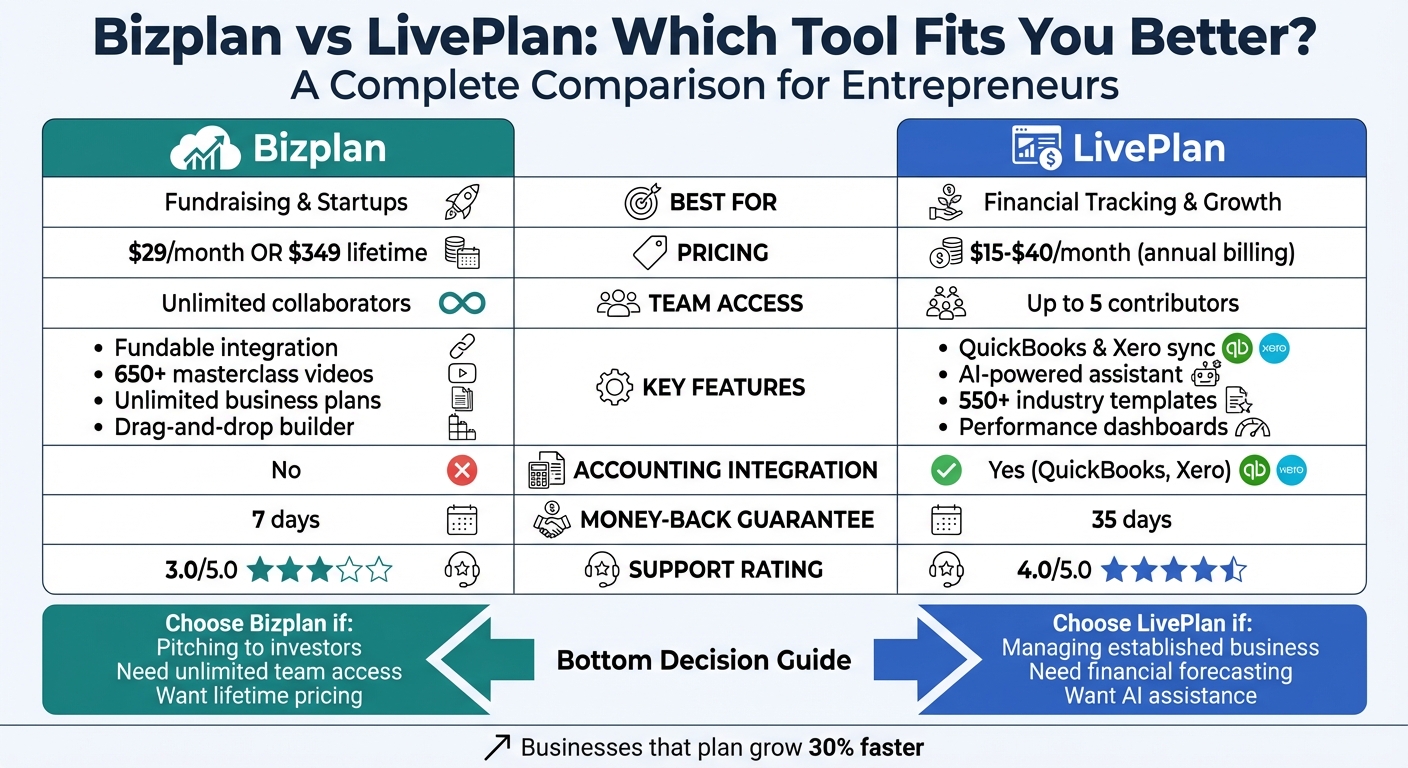
Bizplan vs LivePlan: Feature and Pricing Comparison Chart
Liveplan vs Bizplan Which Is Better?
sbb-itb-08dd11e
What Is Bizplan?
Bizplan is a tool designed to help startups and entrepreneurs secure funding. It’s part of the Startups.com ecosystem, which has assisted founders in raising over $500 million in committed capital through its integrated platform, Fundable. With Bizplan, creating a business plan becomes more manageable thanks to its drag-and-drop builder that organizes your plan into clear sections.
What makes Bizplan stand out is its combination of business planning tools with educational and fundraising resources. Every subscription includes access to Startups Unlimited, which features over 650 masterclass videos, 1,255 guides, and a network of 20,000 founders and experts.
The platform’s Financial Command Center simplifies financial projections by automatically generating key documents like profit and loss statements, balance sheets, and cash flow reports. This means you can estimate salaries, forecast revenue, and track expenses without needing advanced accounting skills. Once your plan is ready, you can export it as a professional PDF or share it through a web link, making it perfect for investor pitches.
Here’s a closer look at Bizplan’s features, pricing, and who it’s best suited for.
Bizplan's Main Features
Bizplan provides a step-by-step business plan builder with prompts and templates that help you organize your ideas. You can personalize your plan with photos, custom formatting, and brand colors, all while using a drag-and-drop interface to rearrange sections. These tools are designed to prepare you for pitching to potential investors.
Collaboration is a key feature, allowing co-founders, advisors, and investors to review and comment on your plan. However, the platform doesn’t support real-time co-editing.
A direct integration with Fundable gives you access to equity crowdfunding tools, streamlining the fundraising process. For businesses already up and running, Bizplan also supports importing financial data from QuickBooks Online and Xero, though integration capabilities may vary.
Bizplan has helped companies achieve impressive results. For instance, Plumlife raised $6 million, and Olaeris secured $10 million in funding. Nate Checketts, CEO of Rhone Apparel, shared his experience:
"The education, tools and mentorship the Bizplan team provided was instrumental in our fundraising efforts."
Bizplan Pricing Plans
Bizplan offers straightforward pricing with three options, all of which include unlimited business plans, unlimited collaborators, and full access to its features:
- Monthly Plan: $29 per month, ideal for short-term flexibility.
- Annual Plan: $20.75 per month (billed at $249 annually), providing a 50% discount compared to the monthly plan.
- Lifetime Access: A one-time payment of $349, offering permanent access without recurring fees.
The lifetime plan is particularly useful for consultants, serial entrepreneurs, or anyone who plans to use the platform long-term. All plans come with a money-back guarantee if requested within three to seven days of purchase. Mashable described Bizplan as "a must-have for anyone starting a business", while Marcus V., a retail founder, shared:
"My idea stayed an idea for almost 5 years. Once I started using Bizplan it came to life."
Best Users for Bizplan
Bizplan is best suited for early-stage startups aiming to secure investment. Whether you’re pitching to angel investors, venture capitalists, or preparing for an equity crowdfunding campaign, Bizplan’s connection to fundraising tools simplifies the process.
Consultants also find value in the lifetime plan, which allows them to create unlimited business plans for clients without ongoing subscription costs. The platform’s guided planning process is especially helpful for startups in their early stages or teams that prefer structured guidance. That said, if you need advanced features like AI writing tools, custom financial formulas, or dynamic scenario modeling, Bizplan’s templates may feel somewhat limited.
Cheryl Y., a SaaS founder, shared her thoughts on the platform:
"The combined power of Bizplan and Startups.com gave me the support and knowledge I needed to build a plan along with the tools to get it done."
What Is LivePlan?
LivePlan is a business planning tool that's been trusted by over 1 million entrepreneurs to build, manage, and grow their businesses. It transforms your business plan into an interactive performance tracking system. By combining guided planning tools with financial dashboards that sync with your accounting software, it lets you compare your forecasts to actual results in real time.
With over 550 industry-specific sample plans formatted to meet SBA standards, LivePlan makes it easy to create lender-ready documents. Its AI-powered assistant, built on decades of planning expertise, helps you focus on the details that matter most to investors. Research even shows that businesses using tools like LivePlan grow 30% faster than those that don't.
Unlike Bizplan, which leans heavily on fundraising support, LivePlan shines in operational forecasting and real-time performance tracking. It's designed to support businesses at various stages - whether you're brainstorming a new venture, seeking funding, or monitoring an established company's progress. Rob Mackley from the Xero App Store shared his experience:
"I've been using LivePlan with Xero for a few months now and love it. It's given me visibility about how we're doing against Forecast like I've never had before..."
Let’s dive into the features that make LivePlan stand out.
LivePlan's Main Features
LivePlan simplifies creating a professional business plan with its step-by-step builder. It also automates key financial documents like profit and loss statements, cash flow forecasts, and balance sheets based on your inputs.
The platform’s AI-powered assistant offers suggestions, rewrites content, and helps address investor concerns, drawing from 30+ years of planning expertise. With over 550 templates across various industries, you can quickly get started, and the platform even supports multiple languages, including Spanish, French, Italian, German, and Brazilian Portuguese.
For established businesses, the Premium plan offers performance dashboards that pull actual financial data and compare it to forecasts, giving you a clear picture of your business's health. This feature is especially helpful for ongoing performance tracking, which sets LivePlan apart from Bizplan’s focus on early-stage startups. The "What-if" scenario tool allows you to test up to 10 financial assumptions to see how different decisions could impact your revenue and cash flow before committing.
Collaboration is another strong point. Up to five contributors can work on a plan, and unlimited guest access is available for advisors or investors. Plans can be exported to various formats, including PDF, Word, Excel (for financials), and PowerPoint (for pitch decks). Mike R. from Shopper Approved highlighted the platform’s balance of vision and practicality:
"LivePlan provides the balance between stating your vision, the framework to support it, and the numbers."
LivePlan Pricing Plans
LivePlan offers two subscription tiers, with both monthly and annual billing options. Choosing the annual plan provides savings compared to monthly billing.
- Standard Plan: $20 per month (monthly billing) or $15 per month when billed annually ($180 per year). This plan is ideal for startups needing lender-ready business plans. It includes the core planning tools, AI writing assistant, 550+ sample plans, and full financial forecasts.
- Premium Plan: $40 per month (monthly billing) or $30 per month when billed annually ($360 per year). This plan adds QuickBooks Online and Xero integration, performance dashboards with 20+ trend reports, up to 10 "What-if" scenarios, market research data, and industry benchmark comparisons.
Both plans support one active company and up to five contributors, with unlimited guest access. Subscriptions come with a 35-day money-back guarantee. For additional guidance, the optional LivePlan Coach add-on is available for $30 per month, offering one-on-one video sessions with expert advice.
Best Users for LivePlan
LivePlan’s features and pricing make it a great choice for a wide variety of business owners. It’s particularly suited for small business owners and entrepreneurs who want a guided, beginner-friendly approach to business planning. About 60% of its users are small businesses (1–50 employees), while the rest are split between individual users and mid-size companies.
The platform excels at creating plans tailored for banks or investors, thanks to its SBA-approved formatting and automated financial tools that generate professional reports like profit and loss statements and cash flow forecasts.
Established businesses will appreciate the Premium plan’s performance tracking features, especially if they use QuickBooks Online or Xero to monitor actual results against forecasts in real time. Matthew H. from Capterra shared his insights:
"I learned more about running my small business from a week of focused work in [LivePlan] than I have from any other single source."
While LivePlan supports up to five contributors, it may feel limited if you need real-time co-editing or highly customized templates.
Feature Comparison: Bizplan vs LivePlan
When you dive into the features of Bizplan and LivePlan, their distinct approaches to business planning become clear. Each platform caters to unique entrepreneurial needs, making them suitable for different types of users.
Bizplan leans heavily into fundraising and team collaboration. It integrates directly with Fundable, a crowdfunding platform, which makes it a standout choice for startups aiming to raise capital. Plus, it allows for unlimited team collaboration, making it ideal for businesses with large or growing teams. Alongside these, Bizplan offers a wealth of educational resources through its Bizplan University. This includes masterclasses, guides, and access to a vibrant founder community - all of which are designed to empower entrepreneurs with the knowledge they need to succeed.
On the other hand, LivePlan shines in financial management and performance tracking. It syncs seamlessly with accounting tools like QuickBooks and Xero, enabling users to compare forecasts with actual results in real time. The platform also features an AI-powered assistant to help refine business plans, drawing on decades of expertise. While LivePlan limits team collaboration to five members, it compensates with advanced tools like "what-if" scenario planning and industry benchmarks to evaluate financial outcomes. Additionally, LivePlan offers over 500 industry-specific sample plans, giving users a solid foundation to build their strategies.
Collaboration is another area where these platforms differ significantly. Bizplan's unlimited team member feature makes it practical for startups with large teams, while LivePlan's five-member cap is better suited for smaller businesses or solo entrepreneurs. However, both platforms allow unlimited guest viewers, so advisors and investors can easily access plans without extra fees.
Here's a quick side-by-side comparison to highlight their key differences:
Feature Comparison Table
| Feature | Bizplan | LivePlan |
|---|---|---|
| AI Assistance | No | Yes (LivePlan Assistant) |
| Collaboration | Unlimited team members | Up to 5 team members |
| Fundraising | Integrated with Fundable | One-page pitch builder |
| Accounting Sync | None | Syncs with QuickBooks and Xero |
| Templates | Drag-and-drop modules | 500+ industry-specific examples |
| Strategic Tools | Progress tracker | "What-if" scenarios & Benchmarks |
| Support | Email, Chat, and Call | Email and Chat |
| Educational Content | Masterclasses and Guides | Video tutorials and expert examples |
| Money-Back Guarantee | 7 days | 35 days |
These features highlight how Bizplan and LivePlan cater to different priorities. Bizplan is tailored for startups focused on building teams and raising funds, while LivePlan excels at helping small businesses manage finances and evaluate performance. Up next, we'll explore how their pricing and user experiences stack up.
Price Comparison: Bizplan vs LivePlan
Bizplan and LivePlan take different approaches to pricing. Bizplan offers three straightforward plans: $29 per month, $249 annually (averaging about $20.75 per month), or a one-time lifetime fee of $349. All plans include unlimited business plans, team members, and access to over 600 Bizplan University courses. The lifetime option is particularly attractive for entrepreneurs managing multiple ventures or consultants working with various clients.
LivePlan, on the other hand, features a two-tier pricing model. The Standard plan costs $20 per month (or $15 per month if billed annually at $180), while the Premium plan is $40 per month (or $30 monthly when billed annually at $360). The Premium plan includes advanced features like "what-if" scenarios, performance dashboards, and accounting integrations with QuickBooks and Xero - tools not available in the Standard tier. LivePlan also offers a Coach add-on for personalized guidance at an extra $30 per month. However, LivePlan accounts are limited to five contributors and one active company per subscription, with additional charges for extra users or companies.
Refund policies also vary. LivePlan provides a generous 35-day money-back guarantee, while Bizplan's refund window is limited to 7 days. Since neither platform offers a free trial, these guarantees act as a substitute for testing the software. LivePlan often runs promotional discounts, such as 50% off the first month for new users or 40% off annual plans for established businesses. These pricing differences reflect each platform's focus: Bizplan emphasizes comprehensive support for investor-ready plans, while LivePlan prioritizes detailed financial forecasting.
Below is a side-by-side comparison of the pricing and features:
Pricing Comparison Table
| Feature | Bizplan | LivePlan Standard | LivePlan Premium |
|---|---|---|---|
| Monthly Cost | $29 | $20 | $40 |
| Annual Cost | $249 ($20.75/month) | $180 ($15/month) | $360 ($30/month) |
| Lifetime Plan | $349 (one-time) | Not Available | Not Available |
| Team Member Limit | Unlimited | 5 Contributors | 5 Contributors |
| Active Companies | Unlimited | 1 | 1 |
| Money-Back Guarantee | 7 Days | 35 Days | 35 Days |
| Accounting Integration | No | No | Yes (QuickBooks/Xero) |
| "What-If" Scenarios | No | No | Yes (up to 10) |
| Additional Costs | None | Coach: $30/month | Coach: $30/month |
User Experience and Customer Reviews
LivePlan stands out for its easy-to-follow, step-by-step approach, making it a favorite among first-time business planners. Users often praise its video tutorials and industry-specific examples, which simplify the process for those with limited experience. As EduReviewer puts it, "LivePlan is suitable for people who have little knowledge of business planning". Its automated financial formulas and seamless integration with QuickBooks and Xero further enhance its appeal by simplifying financial management tasks.
Bizplan, on the other hand, takes a modular approach with its drag-and-drop design, breaking the planning process into smaller, manageable steps. However, users have criticized its interface as unattractive and noted that creating financial models can be a lengthy process. Upmetrics highlights this by stating, "The process of creating a financial model [in Bizplan] is time-consuming and getting to grips with the platform can be a bit challenging". That said, Bizplan’s integration with Fundable and its lifetime pricing option make it especially attractive for entrepreneurs focused on securing funding. These differences highlight how each tool caters to specific needs - LivePlan for financial tracking and Bizplan for fundraising.
When it comes to customer support, LivePlan shines with its responsive Customer Advocacy Team. Users frequently commend the platform for its rapid email and live chat assistance, with average chat wait times under 15 seconds. A Trustpilot reviewer shared their experience, saying, "My recent experience with LivePlan demonstrated that even when facing a difficult technical problem, the support team is willing to provide explanations and explore out-of-the-box solutions". Support is available Monday through Friday, 8 am to 5 pm Pacific Time.
Bizplan provides support through email, chat, and phone across all pricing tiers. While EduReviewer describes its customer service as prompt during business hours, some Trustpilot reviews paint a more mixed picture. Issues like difficulty obtaining refunds within the 7-day guarantee period and unresolved technical problems have been reported. One frustrated user noted, "The software is not able to compute basic calculations, support isn't able to fix or to explain it... they refuse to refund although they weren't able to deliver".
User Ratings Table
| Feature | Bizplan | LivePlan |
|---|---|---|
| Ease of Use | Moderate (drag-and-drop modules) | High (step-by-step guidance) |
| Customer Support Rating | 3.0/5.0 | 4.0/5.0 |
| Support Channels | Email, Chat, Phone | Email, LiveChat (no phone) |
| Average Chat Response | Mixed user reports | Under 15 seconds |
| Customization Options | Modular templates; limited aesthetics | 500+ templates; limited fonts |
| Integration Setup | Manual entry only | QuickBooks, Xero sync |
| Money-Back Guarantee | 7 days | 35 days |
Conclusion
Both Bizplan and LivePlan cater to specific business planning needs, making the right choice largely dependent on your current goals and stage in the entrepreneurial journey.
For those focused on ongoing business management and financial tracking, LivePlan stands out. Its integration with QuickBooks and Xero, along with AI-driven guidance and advanced "what-if" scenario planning, makes it an excellent choice for established small businesses. The platform's step-by-step instructions and AI writing tools simplify the process for newcomers. With a 35-day money-back guarantee and budget-friendly pricing, it’s a low-risk option to see if it fits your workflow. Plus, businesses that actively plan and track their progress grow 30% faster than those that don’t.
Meanwhile, Bizplan shines for startups looking to secure funding. Its direct connection to the Fundable crowdfunding platform - credited with helping startups raise over $500 million in committed capital - gives it a clear edge for entrepreneurs seeking investors. The unlimited collaborators feature is perfect for teams with advisors, co-founders, or investors, and its educational resources provide valuable support during the fundraising process.
Which Tool Should You Choose?
To recap:
- LivePlan: Best if you’re managing an established small business, need AI assistance for drafting plans, want to compare your performance to industry benchmarks, or value guided support for business planning.
- Bizplan: Ideal for startup founders preparing to pitch investors, need unlimited team access without extra fees, or prefer a one-time payment option like the $349 lifetime plan, which offers long-term savings.
FAQs
Which plan is better for an SBA loan?
When applying for an SBA loan, the best choice often comes down to having strong tools for financial forecasting and detailed business planning. LivePlan is frequently recommended because of its powerful features like financial performance tracking and scenario analysis - both essential for meeting lender expectations. While Bizplan provides guided planning, LivePlan’s emphasis on demonstrating financial viability makes it a standout option for SBA loan applications.
Can I use either tool for multiple companies?
Yes, both Bizplan and LivePlan are suitable for creating business plans for multiple companies. These platforms offer templates and step-by-step guidance, making them helpful tools for entrepreneurs managing different ventures. While they don’t explicitly highlight features tailored for handling multiple companies, their functionality is flexible enough to support planning across various projects, catering to the needs of business owners juggling multiple endeavors.
How hard is it to switch tools later?
Switching between tools can be a simple process or a bit more involved, depending on the platform and how comfortable you are with business planning software. Generally, it means exporting key data - like financial forecasts and business plans - and then either importing it into the new tool or transferring it manually. Two things to keep in mind are whether the data formats are compatible and how complex your plans are. You might need to review and reformat your data to make sure everything transfers accurately during the switch.
Related Blog Posts
- Business Plan vs Lean Canvas: Which to Choose?
- The Best Liveplan Alternatives In 2025 (Reviews and Prices)
- How IdeaFloat Automates Your Entire Business Planning Process
- LivePlan Pricing Alternatives for Budget-Conscious Founders